Google Business Profile Suspended, Reinstated, Then Suspended Again? How to Break the Loop
Short answer: Your profile keeps getting suspended again because the appeal only got the profile back. It never fixed whatever triggered the suspension in the first place. Getting reinstated means Google decided your business is real, but it does not mean your listing now follows the rules. Until you find the actual trigger and fix it, usually a duplicate listing, a name that does not match your paperwork, the wrong category, or an address problem, the next automated check will flag the profile again. That said, there is not always a clear trigger to find. Google does not always explain why it took a profile down, and sometimes a listing gets suspended for no apparent reason or simply by mistake. So the first step is to stop appealing, find the trigger if there is one to find, fix it, then appeal once with documents that match.
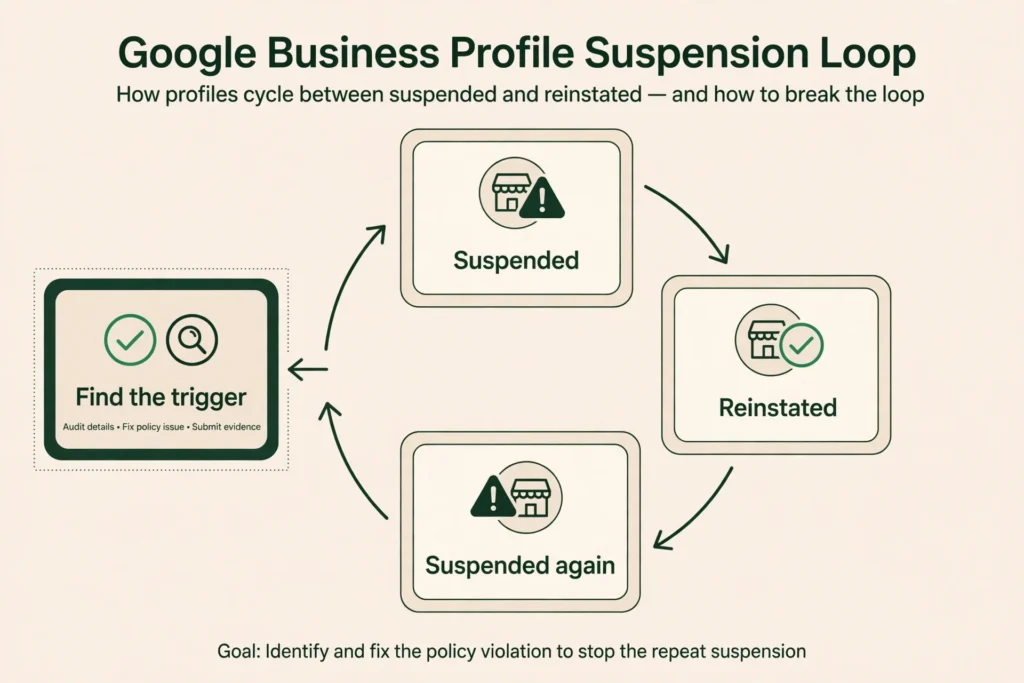
You know the pattern. The calls stop, the profile is suspended, you send your documents and file the appeal, and a few days later it comes back. Then, sometimes within days, it is suspended again. The appeal answers one question, whether this is a real business, while the suspension is about a different question, whether this listing follows Google’s rules. A profile can pass the first check and fail the second, over and over. No promises here about reinstatement. Google decides that, not us, and not any agency.
First: soft suspension or hard suspension?
It matters which one you have. A soft suspension means the profile is still visible on Search and Maps, but you cannot edit it and some features stop working. A hard suspension means the profile is gone from Search and Maps entirely. The fix is the same either way — find the trigger, fix it, then appeal — but a hard suspension usually means a bigger rule break, and it takes longer to come back
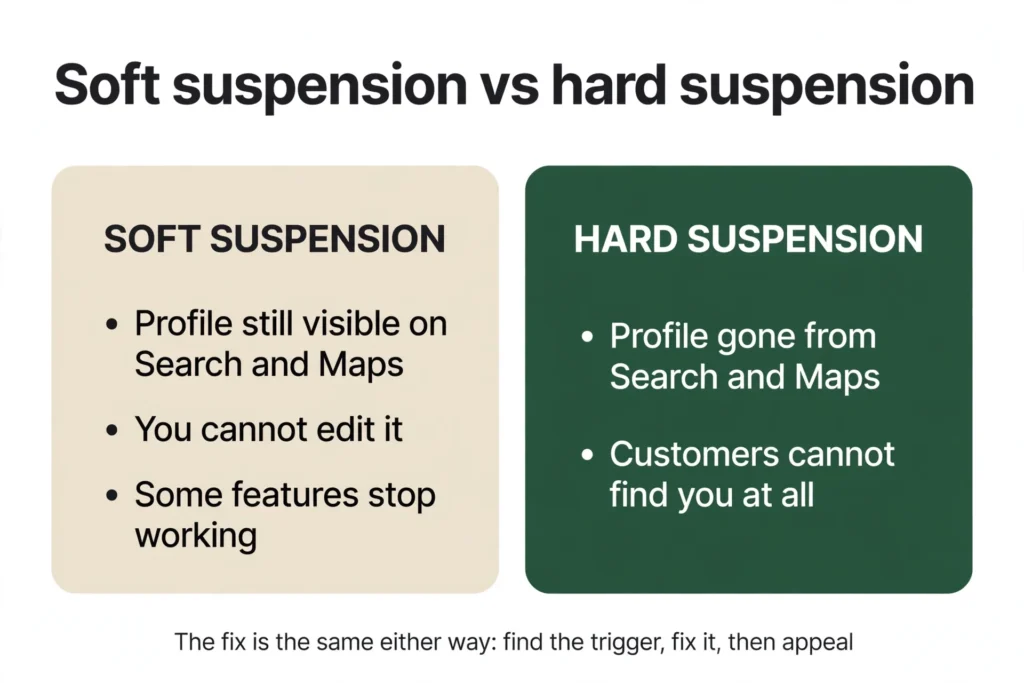
These are terms the SEO industry uses. They were coined by Joy Hawkins at Sterling Sky, and they are not Google’s official labels, so a Google support agent might not understand what you mean by them. The distinction is still useful, because it tells you how serious the problem is.
Why the loop happens
There is usually a specific trigger, though not always. For home-service businesses, it is usually one of these.
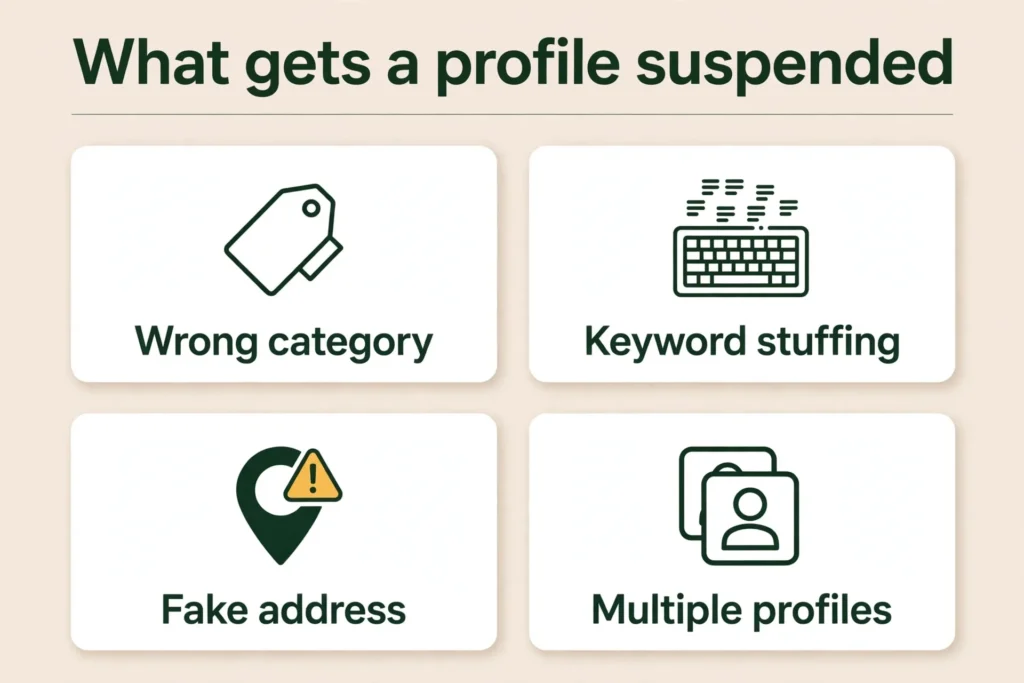
1. The trigger was never fixed. A successful appeal gets the profile reinstated, but it does not remove what caused the suspension. If the name, category, address, or duplicate is unchanged, the next automated check flags it again. A just-reinstated profile can also get suspended again very quickly, sometimes within days, even when a human reviewer already cleared it. The re-suspension itself is well documented, even if nobody outside Google can say exactly why the second check trips.
2. There is a second profile still live. A duplicate can come from a previous owner, a previous address, or a second profile made after losing access to the first. Google allows one profile per location, so reinstating one does not remove the other, and the loop continues until the duplicate is gone.
3. The business name does not match the paperwork. The name on the profile must match the business’s real, registered name. Even a small difference can trigger it, and keyword padding, like “Mike’s Plumbing — Emergency Plumber Dallas Same Day Service,” is a violation, not a business name.
4. The category does not fit the work. Your primary category must be work you can prove you do. A contractor listed under a licensed trade nobody at the business holds, or a category far broader than the work you do, is a reason Google keeps flagging you, and it is one of the 7 most common Google Business Profile mistakes we see.
5. The address is the problem. A service-area business that still shows a street address it should have hidden. A virtual office or UPS box, which Google does not accept. Or an address that does not match your website, registration, and directories. A coworking address is a different case: Google allows it, but only if the office has clear signage, receives customers at the location during business hours, and is staffed by your business staff during business hours. An unstaffed shared desk or a mailbox-only coworking address does not qualify.
6. Your details do not match anywhere else. Google gathers information from different sources, and when those sources disagree, a different phone here or an old address there, the listing looks unreliable. This is a NAP consistency problem: your name, address, and phone must match everywhere, exactly the same, letter for letter. A mismatch on its own is rarely the direct cause of a suspension, but it is almost always a contributing factor, because it makes the listing harder for Google to trust.
7. You edited the profile right after it came back. Changing the name, category, or address right after a reinstatement, or changing several fields at once, can restart the loop. Google finds bulk edits suspicious, because that is also what happens when a listing gets hijacked: someone takes control and makes a bunch of changes at once. So leave the profile alone for a few days after it comes back, and when you do make changes, make one at a time.
8. Verification and suspension are two different checks. This is the “approved then disabled” pattern. A video verification proves the business exists at a real location. The suspension decision checks whether the listing follows the policies, name, category, address, duplicates, and passing the first check does not clear the second.
9. The account is restricted, not just the profile. If the Google account managing the profile is restricted, every profile under it is suspended, and appealing the listing alone does nothing. The account appeal comes first. If several locations went down at once, check the account before the listings.
10. The photos, services, or website don’t match the listing. Stock photos, photos of another business, services listed that you don’t actually provide, wrong hours, or a website that is down or shows a different name, address, or phone number. Google compares the listing against all of it, and a mismatch in any of them can be the trigger.
11. Someone else reported or edited your listing. A competitor can report a listing, and anyone can suggest an edit on Google Maps. If Google accepts a wrong suggestion, your name or category changes without you touching it. If the loop started after a change you didn’t make, this is where to look.
How to find the actual trigger
Do this before you appeal again. It takes an afternoon.
- Read the reason Google gave you, the exact decision, date, and policy in the appeals tool. Your appeal must address that rule, not just say the business is real.
- Search Google Maps for your business name and city. Look for a second profile, including old names, old addresses, and spelling variations.
- Compare the profile against your paperwork, character by character, name, category, address, and phone versus registration, licence, utility bill, and website footer.
- Work out what changed in the 30 days before the first suspension. The trigger is often the most recent change.
- Check whether the account is restricted, and who else can edit the profile, staff, a former manager, an old agency, or a customer suggestion Google accepted.
- Look at the photos on the profile and the website. Stock images, photos of another business, services you don’t offer, wrong hours, and a website that is down or shows different details from the profile.
- Read Google’s guidelines for representing a business. Most loops trace back to one line in there.
If everything matches, Google may have swept your whole trade. When a trade has a lot of spam listings, Google sometimes flags real businesses too, because it is cracking down on a particularly spammy industry. Say plainly what you checked, with the documents attached.
The fix, in order
Order matters. Appealing before the cause is fixed wastes the appeal, and editing during an appeal can restart the cycle.
Step 1: Stop. Do not appeal again yet, and do not edit the profile. Write down the reason, the date, and what you have already tried.
Step 2: Deal with the duplicate first, if there is one. Claim it if you can, then request its removal.
Step 3: Fix the fields you can reach. Correct the name to match your registration exactly, set the category to work you can document, and fix the phone number. Then fix the photos, services, and website too: remove stock or misleading photos, take out services you don’t provide, correct the hours, and make sure the website is live and shows the same name, address, and phone number as the profile.
Step 4: Fix the address setup. If you go to customers, hide the street address and set the cities you serve. If customers come to you, the address must be a real, staffed location that matches your paperwork.
Step 5: Gather your documents before you open the appeal, registration, licence, a recent utility bill or lease, and photos of real signage or a branded vehicle. The name and address on every document must match the profile.
Step 6: Appeal once, through the appeals tool. Google’s own page, Fix suspended or disabled profiles, explains the process and what evidence to attach. Say plainly what you changed and which rule it addresses, and attach the documents. A specific appeal beats “please reinstate us, we are a real business.”
Step 7: Wait, and do not touch the profile. Do not edit anything while the appeal is under review, and do not file a second appeal on the same decision. Google says appeal reviews can take up to 5 business days, but in practice it often takes much longer. Practitioners have reported waits of four to six weeks during busy periods, so do not assume a few days is the norm.
Step 8: When it comes back, leave it alone for a few days, then change one significant field at a time.
Step 9: If it is denied, find what you missed. Read the denial, go back through the checklist, and appeal again with something new. If the appeal is turned down, you can also ask for an additional review through Google’s contact form, with evidence you did not send the first time. If Google tells you in writing that the profile cannot be restored, only then consider starting fresh, and fix the real problem first.
Step 10: If it is suspended again days after coming back, don’t start from scratch. A just-reinstated profile can get suspended again very quickly, and that second suspension can trip on something a human reviewer already cleared. Go back through the same appeal page, attach your old case number, and say clearly: this is the same case, suspended again after Google already gave it back. Don’t open a brand-new appeal.
What NOT to do
- Do not create a second profile to work around it. Google says so directly, and a second profile is a duplicate, which is one of the causes of the loop.
- Do not change the name, address, or category to dodge the flag. It reads as deceptive and creates a new mismatch with your paperwork.
- Do not appeal five times with the same evidence. Each appeal should add something, a fix, a document, a correction.
- Do not edit the profile while an appeal is in progress. Every edit during a review can restart the cycle.
- Do not buy reviews, and do not pay anyone who guarantees reinstatement. Nobody can guarantee Google will reinstate a profile.
When to appeal, and when to fix first
Appeal now if you found the trigger, fixed it, and have documents that match the corrected profile.
Fix first if you do not know the trigger yet. An appeal that only says “we are a real business” is the appeal that already failed.
If the account is restricted, appeal the account first. And if you have been through this loop three or four times, get a second pair of eyes on the profile, because the trigger is usually something you have stopped seeing.
Frequently asked questions
Because reinstatement and compliance are two different things. The appeal decided your business is real. The suspension was about whether your listing follows the rules. If that trigger is still there, the next check flags it again. And sometimes there is no clear trigger to find: Google does not always explain why it took a profile down, and a listing can be suspended for no apparent reason or simply by mistake.
You get one appeal per decision. If it is denied, you can ask for an additional review, but it needs something new, a fix or a document you did not send before.
No, not while the suspended one exists, and not before the cause is fixed. A new profile is checked against the same rules. Only consider it if Google has told you in writing that the old one cannot be restored, and only after the root cause is fixed.
Google says appeal reviews and decisions can take up to 5 business days. In practice, it often takes much longer. Practitioners have reported waits of four to six weeks during busy periods, and the appeal queue has blown out to five or six weeks in early 2025. Do not file duplicate appeals while you wait.
Because the documents and the listing answer different questions. Your registration proves the business exists. The suspension is about whether the listing follows the rules. Approved documents do not fix a keyword-stuffed name or a live duplicate.
If the profile is reinstated quickly, it usually returns to the ranking positions it had before the suspension. Some practitioners report that it can take a few weeks for visibility to fully settle, especially after a longer suspension, while others have found no recovery period at all when reinstatement is quick. Keep the details stable and the profile active, and do not make big changes in the first few weeks. If it is not showing up at all, it may be suppressed rather than suspended, see our guide to suppressed vs suspended profiles.
Because the trigger may be one of the less obvious ones: a duplicate profile still live, an account restriction, a website or photos that don’t match, or an edit someone else made. This is the ‘suspended for no reason’ case owners search for, and usually there is a reason, just not an obvious one, though sometimes a profile really is caught in a sweep with no clear trigger. Work through the whole checklist above, not just the fields you already fixed. If everything genuinely matches, say that plainly in the appeal, list what you checked, attach the documents, and let Google see the work. If an appeal stalls with no answer for weeks, posting your case in Google’s Business Profile Help Community can help, because the product experts there can ask Google to look at a stuck case again.
Usually because the listing breaks one of Google’s rules, a name that doesn’t match the paperwork, the wrong category, an address problem, a duplicate listing, or misleading content such as ‘deceptive content’ or ‘misleading information.’ The suspension email or the appeals tool states the exact reason and the rule. Fix that specific trigger, then appeal. Appealing without fixing it is what starts the loop. That said, Google does not always give a useful reason, and a listing can be suspended for no apparent reason.
Through the Google Business Profile appeals tool: sign in with the account that manages the profile, select the business, read the stated reason and policy, attach documents that match the corrected profile (registration, licence, utility bill), and submit one appeal. If it is denied, you can ask for an additional review through Google’s contact form with new evidence. Don’t file duplicate appeals on the same decision.
Work through the checklist in this article first, find the trigger (duplicate, name, category, address, photos or website mismatch), fix it, gather matching documents, then appeal once. Fixing the cause before appealing is the whole difference between getting reinstated and getting suspended again.
Don’t create a new profile and don’t file several appeals at once. Read the reason Google gave, find the trigger with the checklist above, fix it, then appeal once with matching documents. If the whole Google account is restricted, appeal the account first.
What to do next
If your profile is in this loop, the next step is not another appeal. It is an afternoon with the checklist above: find the duplicate, match the name to the paperwork, fix the category and the address setup, then appeal once with the documents attached.
If you would rather have someone else find the trigger, that is what we do. Axiom Digital works with home-service businesses across the US, 75+ clients, 24 trades, one client per city, month-to-month. Our Google Business Profile management service covers this kind of problem, and our free audit will tell you what is wrong with your profile before you spend anything. Get your free audit, or call +1 (945) 215-1067, Mon–Sun, 9:00–17:00.
Nobody can promise your profile will be reinstated. Google decides that. What we can promise is that we will find the trigger and fix it properly, so the next appeal is made with the cause gone — which is the only way the loop ends.
See What This Looks Like for Your Business
Free audit, real numbers, no obligation. We’ll show you exactly where you stand and what it would take to rank #1 in your market.
📋 Get My Free Audit →