How to Rank Higher on Google Maps
The short answer: how to rank higher on Google Maps
Here is how to rank higher on Google Maps: give Google a complete and accurate Business Profile, choose the most specific category for the work you actually do, and build prominence through real reviews and links from other websites. Google ranks local results on three factors, relevance, distance, and prominence, and no amount of posting or keyword stuffing changes that. The steps below work through each factor, the profile fixes that help, and the things that do not move you up.
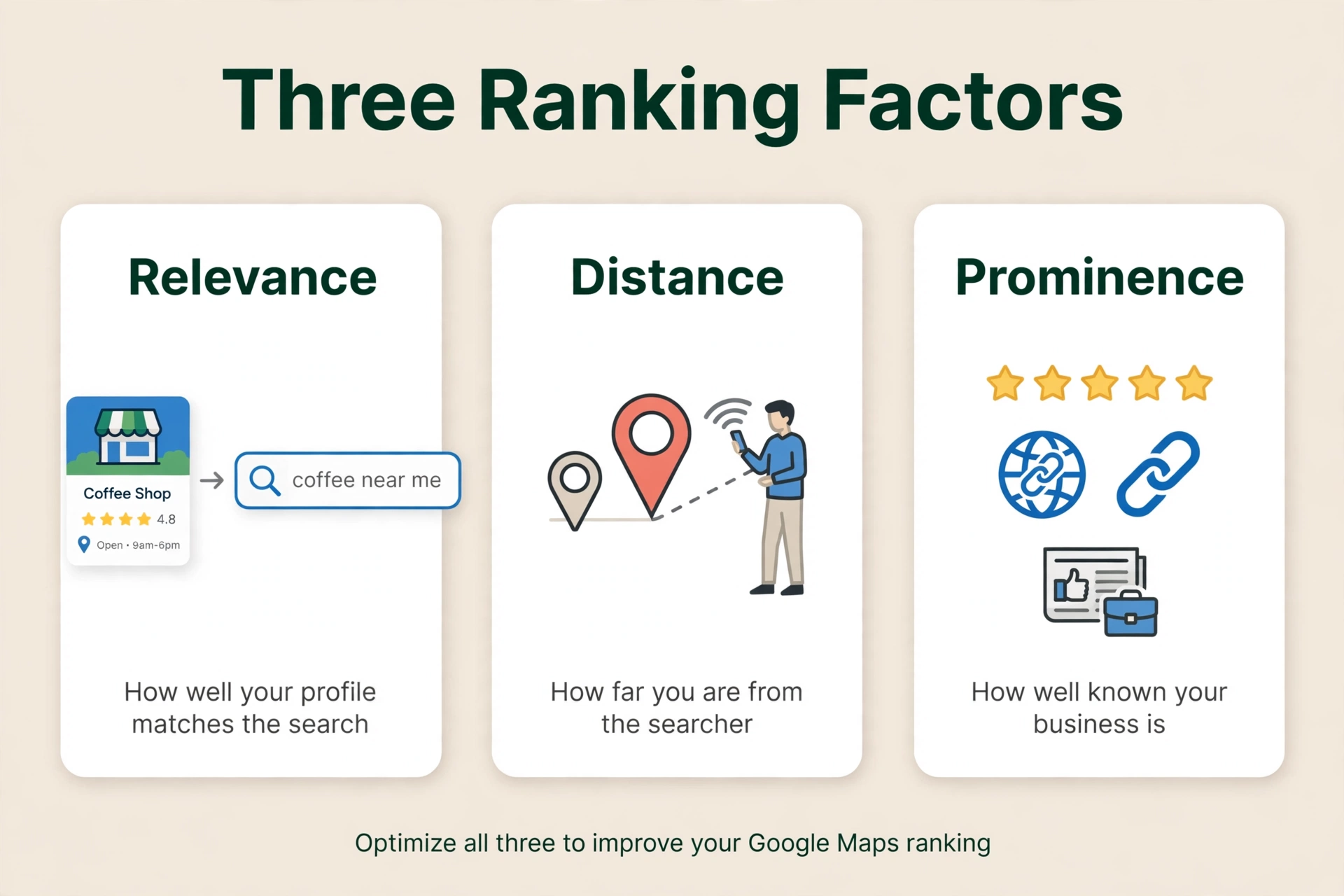
How to rank higher on Google Maps: the three factors Google uses
Google’s ranking guidance says local results are mainly based on three factors: relevance, distance, and prominence. (Tips to improve your local ranking on Google)
- Relevance is how well a Business Profile matches what someone is searching for. To help Google understand your business and match it to relevant searches, provide complete and detailed business information.
- Distance is how far each business is from the customer who is searching. If a customer does not share where they are, Google uses what it knows about their location.
- Prominence is how well known a business is. Prominent places are more likely to show up in search results. This factor is also based on information like how many websites link to your business and how many reviews you have. More reviews and positive ratings can help your business’s local ranking.
The block of local business listings shown with a map near the top of Google Search for a local search is the map pack (also called the local pack or the local 3-pack). Owners who want to know how to rank on Google map pack are asking about this block of listings. Typically three businesses are shown. That number is the observed standard, not a number Google publishes. Clicking “More places” opens the Local Finder, which lists 20 or more businesses ranked by the same three factors. The pack is drawn from Business Profiles, not from websites, and it sits above the organic results. The three businesses shown are recalculated for each query and each searcher location.
Distance is measured from the searcher, and a farther business can outrank a closer one if it is a better match for what the person wants. Google Maps Help says exactly that: its algorithms might decide that a business farther away is more likely to have what you are looking for than a business that is closer, and therefore it will rank higher in local results. (Google Maps Help, Search for nearby places)
What this means in practice is simple. You cannot control where the searcher is standing. You can work on relevance, which is how well your profile matches the search, and on prominence, which is how well known your business is. Those three factors are the key to how to rank higher on Google Maps. Everything else in this article is a way to work on one of them, plus the rules you must not break.
Rank higher on Google Maps by verifying and completing your profile
Start with the basics Google itself lists first.
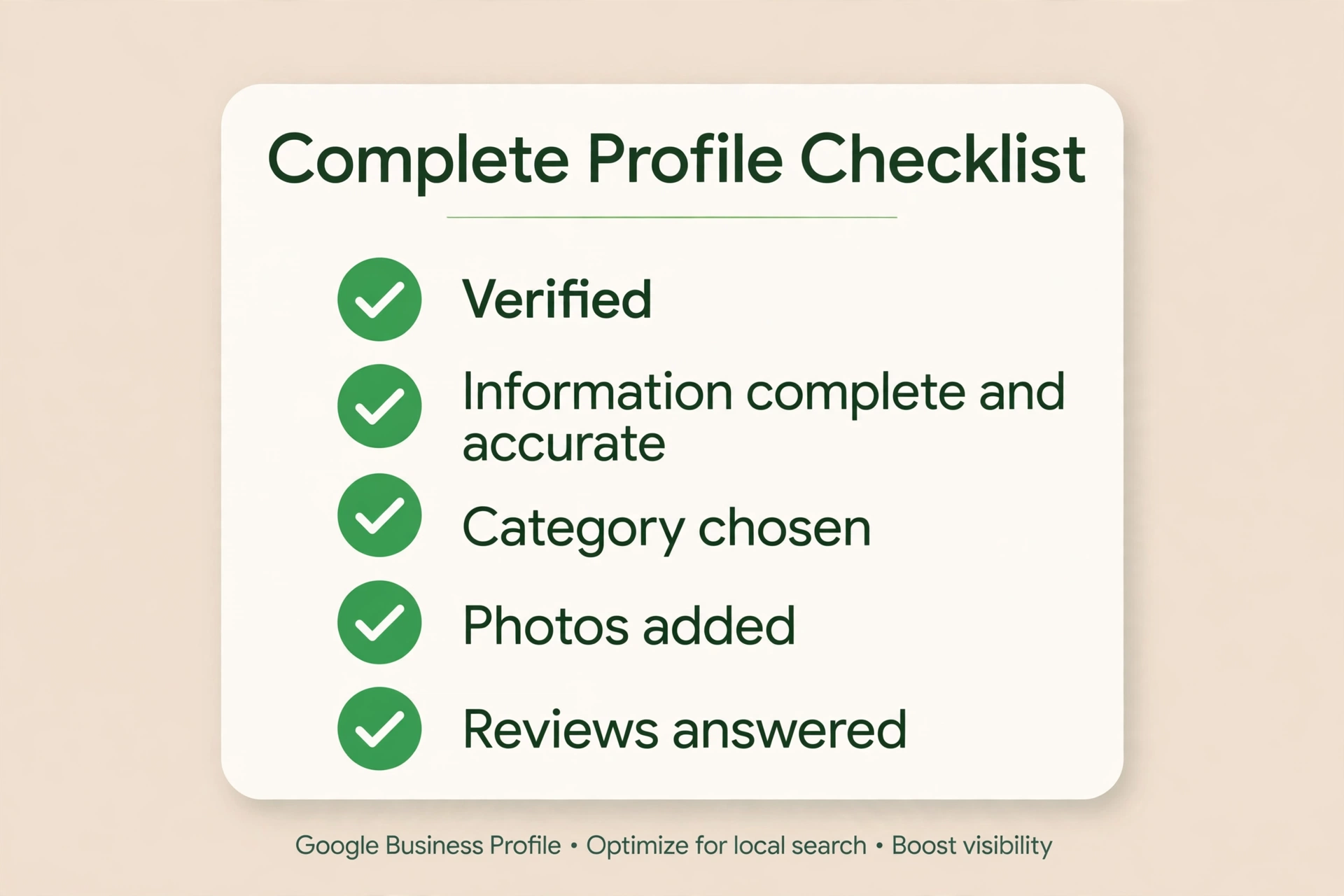
Verify your business. Verification tells Google that you are authorized to represent the business, so the profile is more likely to show up in search results. If you have not verified yet, do that before anything else. If someone else verified your profile, that is a different problem, covered in How to Claim a Google Business Profile Someone Else Verified.
Keep your business information complete and accurate. Google says businesses with complete and accurate information are more likely to show up in local search results, and if your information is not accurate, your profile might not show up for relevant searches in your area. The fields Google names are the full address (if customers can visit), business hours including special hours, business category, and attributes such as parking or Wi-Fi. Fill in every field that applies to you, and keep it true. A plumber who still shows winter hours in July, or a shop whose phone number is an old one, is giving Google a reason to pass it over.
If your hours are wrong, or Google has marked you closed when you are not, fix them first. See How Do I Change My Business Hours on Google?. If your profile has been marked as a duplicate, that is a different fix, covered in How Do I Request a Duplicate Google Business Profile Be Removed or Merged?.
Add photos and videos. Google lists adding photos and videos among its tips: they show customers what you offer and tell the story of your business. Add real photos of your work, your team, and your shopfront, and keep them current. Google lists photos among its tips but does not call them a ranking factor, so do not treat a photo upload as a ranking lever on its own. It is part of a complete profile, not a shortcut.
How to rank higher on Google Maps with the right categories
Google’s guidelines say to choose the fewest number of categories it takes to describe your overall core business, and to choose categories that are as specific as possible but representative of your main business. Do not use categories solely as keywords or to describe attributes of your business. (Guidelines for representing your business on Google)
The test Google gives is to complete the sentence “This business IS a…” rather than “This business HAS a…”. If you are a roofing company that also does kitchens, your business IS a roofing company. It is not a kitchen company. Google also says it can detect category information from your website and from mentions about your business throughout the web, so the categories should agree with what your website says about the work you do.
In Whitespark’s 2026 survey of 47 local search practitioners, the primary category was ranked the number one local-pack factor. That is a survey of expert opinion, not a measurement of Google’s algorithm, but it lines up with what Google’s own guidance implies: the category is the clearest statement of what your business is.
A plumber who also clears drains should use “Plumber” as the primary category and add the drain work as an additional category. An HVAC company that also does plumbing should make the primary category the job that brings the most calls and the most money, and add the other work as additional categories. If your business does many things, the decision is covered in detail in How Do You Pick a Primary Category When Your Business Does Many Things?.
Reviews and your rank on Google Maps
Reviews feed prominence, and Google says so plainly. More reviews and positive ratings can help your business’s local ranking.
Reply to your reviews. Google says that when you reply to customer reviews, it shows that you value their feedback, and that positive reviews and helpful replies can help your business stand out. Reply to the good ones and the bad ones. A short, human reply to a complaint does more for a future customer than a page of five-star reviews with no replies at all.
A steady flow beats a burst. A steady flow of new reviews over time is worth more than ten reviews in one week followed by silence. That is a practitioner observation from people who track local rankings, not a Google rule, but it follows from how prominence works: a business that keeps earning reviews looks alive, and a business whose reviews stopped two years ago does not.
Do not buy, fake, or incentivize reviews. Google’s Maps User Generated Content Policy says fake engagement is not allowed and will be removed. That includes reviews or ratings that have been paid for, directly or in kind; content posted from multiple accounts by or at the request of one person; and content posted using an emulator or other device-tampering service. Merchants may not offer incentives, payment, discounts, or free goods or services in exchange for posting, revising, or removing a review. They may not selectively solicit only positive reviews, discourage or prohibit negative reviews, or pressure users to leave ratings while on the premises. What merchants may do is solicit content that represents a genuine experience, without offering incentives or trying to influence the rating. (Maps User Generated Content Policy)
A profile caught with fake or incentivized reviews faces more than removal. Google says businesses that violate its Fake Engagement policy may be subject to restrictions in addition to having the violating reviews removed. The restrictions Google lists are: the profile will not be able to receive new reviews or ratings for a set period of time; the profile’s existing reviews or ratings will be unpublished for a set period of time; and the profile will display a warning to let consumers know that fake reviews were removed. Google says it will notify business owners by email if it plans to apply a restriction, and businesses have the ability to appeal the decision. Google does not publish how long a restriction lasts. Practitioners have reported cases of 30 days in one case and two months in another. (Business Profile restrictions for policy violations)
Buying reviews is also against the law in the United States. The FTC’s Consumer Reviews and Testimonials Rule, in effect since October 2024, bans buying positive or negative reviews, with civil penalties of up to $53,088 per violation. Each fake review can count as a separate violation.
Google reported removing over 13 million fake Business Profiles in 2025. The way to build reviews is to ask real customers after a job well done, and to reply to the reviews that come in.
Your business name, address, and service area on Google Maps
Your name, address, and service area are governed by Google’s guidelines, and getting them wrong is one of the fastest ways to lose a profile.
Your business name must be your real-world name. Google’s guidelines say your name should reflect your business’s real-world name, as used consistently on your storefront, website, stationery, and as known to customers. Including unnecessary information in your business name is not permitted, and could result in the suspension of your Business Profile.
What is not permitted in the name, using Google’s own examples: marketing taglines; store codes; trademark or registered signs; fully capitalized words; business hours information; phone numbers or website URLs; special characters or irrelevant legal terms such as LLC, LTD, or INC, unless you can prove with real-world evidence they are part of the name; service or product information, for example “Midas Auto Service Experts” is not acceptable while “Midas” is; location information, for example “Equinox near SOHO” is not acceptable; and containment information, for example “Apple Store at Stanford Shopping Center”. The one exception is when the descriptive or location words genuinely are part of the registered, real-world name, a DBA, and you operate under it. That name is acceptable, with proof. (Guidelines for representing your business on Google)
In Whitespark’s 2026 survey of local search practitioners, “keywords in the business title” ranked third among local-pack factors. That only helps when the words are genuinely part of your real-world name. Adding keywords that are not part of your real name breaks the guideline above and can get the profile suspended. If a name problem has already led to a suspension, the fix is covered in Google Business Profile Suspended, Reinstated, Then Suspended Again? How to Break the Loop.
A name change after verification may require re-verification. Google reviews name changes before they go live, and a name change that does not meet Google’s rebranding criteria is treated as a new business, which means marking the old profile closed and creating a new one.
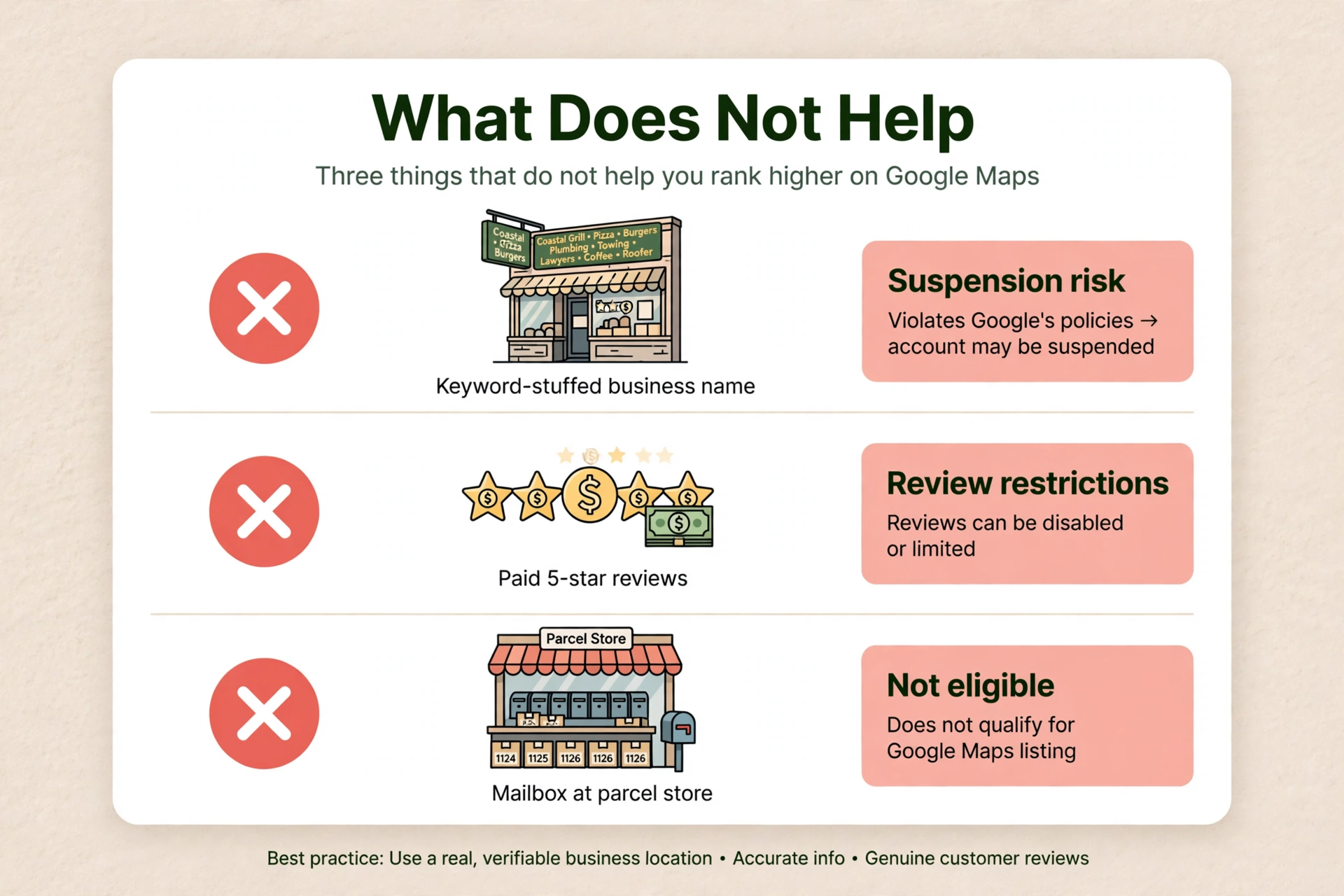
Your address must be precise and accurate. P.O. boxes or mailboxes located at remote locations are not acceptable. If your business rents a physical mailing address but does not operate out of that location, also known as a virtual office, that location is not eligible for a Business Profile. A UPS store address is the same kind of problem. A business cannot list an office at a co-working space unless that office maintains clear signage, receives customers at the location during business hours, and is staffed during business hours by your business staff.
One profile per business per location. Do not create more than one page for each location of your business. A second profile for the same business at the same address is a duplicate by definition, and the fix for that is covered in How Do I Request a Duplicate Google Business Profile Be Removed or Merged?.
Service-area businesses have their own rules. A service-area business should have one profile for the central office or location with a designated service area. If you run the business from home, a plumber is Google’s example, you should hide your business address from customers. The boundaries of your profile’s overall service area should not extend farther than about 2 hours of driving time from where your business is based, though for some businesses a larger service area may be appropriate. A service-area business cannot list a “virtual” office unless that office is staffed during business hours.
Service areas do not extend where you rank. Whitespark’s 2024 service-area tests found that adding service areas made no difference to local rankings. That is a practitioner finding, not a Google statement. Google itself does not say service areas affect ranking; it says they tell customers where you work. Distance is still judged from your base location.
What does not help you rank higher on Google Maps
Some of the most repeated advice about ranking on Google Maps does not work. Here is what the evidence actually says.
Google Posts do not move rankings. Google’s own ranking tips page does not mention Google Posts at all. The only published test, by Sterling Sky in July 2021, tracked three listings, one Google Post per week for nine weeks, and 441 keywords per location. The result was that adding Google Posts had no measurable impact on rankings in the local pack. Joy Hawkins, asked in April 2024 whether there was evidence posts impact rankings, said: “Not that I have ever seen.” In Whitespark’s 2026 survey, post signals rank near the bottom of the local-pack list. Posts are a conversion and engagement tool, not a ranking tool. All of this is practitioner evidence, not a Google statement, and it is the only published evidence on the question.
Keyword-stuffing your business name does not help. It is not permitted under Google’s guidelines and can lead to suspension, as covered in the name section above. It does not move you up. It risks the profile.
Fake, paid, or incentivized reviews do not help. They are banned, and the restrictions are covered in the reviews section above: no new reviews for a set period, existing reviews unpublished, and a public warning on the profile. They do not help you rank. They can take away your ability to receive reviews at all.
Geotagged photos do not help. Practitioner Darren Shaw calls geotagging photos one of those absolutely stupid myths. There is no Google confirmation that geotagged photos affect ranking, and the claim should not be presented as one.
Keywords in your Business Profile description do not help, as far as anyone can show. Practitioner Darren Shaw says Google does not use the description in the ranking algorithm. Google has not confirmed this either way, so treat it as a practitioner observation, not a Google rule. Write the description for customers, not for the algorithm.
Citations and NAP consistency are not Google-stated ranking factors. Google’s ranking guidance does not use the words “citation” or “NAP consistency” anywhere. What practitioners observe, in Whitespark’s 2026 survey, is that citations carry a small share of local-pack weight, around 6 to 7 percent, and a larger share for AI visibility, where three of the top five factors are citation-related. What Google does say is that prominence is based partly on how many websites link to your business. Keeping your name, address, and phone the same everywhere is still a good habit, because your business information has to match the real world. It is also listed among the common Google Business Profile mistakes to avoid. For the same reason, keep the same details on your website and in the main directories: see NAP consistency.
Having a website is not, by itself, a ranking factor Google names for the map pack. Google does not list “have a website” on its ranking tips page. What Google does say is that prominence includes websites linking to your business, and that it can read category information from your website. A website supports relevance and prominence indirectly. It is not a direct lever Google names.
None of these shortcuts is how to rank higher on Google Maps. The way up is the profile work in the sections above.
How long does it take to rank higher on Google Maps?
Google publishes no timeline for ranking improvements. Anyone who gives you a fixed date is guessing, or selling a guarantee Google does not offer.
Practitioners who track this report a range, and these are estimates, not guarantees. Profile and category fixes can show movement in 1 to 3 weeks for low-competition terms. Map-pack visibility in 2 to 8 weeks for a claimed, verified, complete profile in a non-competitive market. Prominence-driven gains, reviews and citations against established competitors, typically take 2 to 4 months. A stable top 3 in competitive keywords takes 4 to 6 months. In competitive metro verticals such as law, dentistry, and HVAC, practitioners report 8 to 16 weeks for the top three. Website and organic rankings take 6 to 12 months.
A BrightLocal survey found that 28 percent of SEO professionals reported noticeable ranking movement within the first month, and 65 percent said tangible lead generation typically began between the 3 and 6 month mark. That is a survey of practitioners, not a Google figure.
The honest answer is that the timeline depends on how competitive your trade and your city are, how complete your profile is, and how much prominence you still need to build. A plumber in a small town with two competitors will see movement faster than an HVAC company in a large metro area with fifty. Start with the profile fixes, because those are the fastest, and treat prominence as work that compounds over months.
Can you pay to rank higher on Google Maps?
No. Google’s own words are: “There’s no way to request or pay for a better local ranking on Google.” Google keeps the search algorithm details confidential to make the ranking system as fair as possible for everyone. (Tips to improve your local ranking on Google)
Google Maps Help says the same thing from the other side: results in Google Maps are not influenced by payment from other companies, and paid content in Google Maps is labelled. (Google Maps Help, Search for nearby places)
Google Ads and Local Services Ads are separate paid products that appear in labelled ad slots. They do not change the organic local-pack order. Owners who search for how to rank on Google Maps sometimes land on offers to buy a ranking. If someone offers to rank you number one for a fee through a back door, there is no back door. The steps are the free ones in this article, or a support case.
What to do next to rank higher on Google Maps
Work in this order. Verify the profile. Fill in complete and accurate information. Pick the most specific category for the work that pays. Reply to reviews and keep earning real ones. Keep the name, address, and service area honest. Then build prominence steadily over weeks and months, and do not chase shortcuts.
If you want a second pair of eyes on the whole profile, Axiom’s free audit looks at the profile, the categories, the reviews, and the wrong directory details together, and tells you what to fix first. If you would rather have the profile watched for you, so a wrong edit or a new duplicate gets caught fast, see GBP management.
Frequently asked questions
Give Google a complete and accurate Business Profile, choose the most specific category for the work you actually do, and build prominence through real reviews and links from other websites. Google ranks local results on relevance, distance, and prominence. You cannot change where the searcher is standing, so the work is on relevance and prominence, and the full steps are in this article.
It is the same question in a shorter form, and the answer is the same. Verify the profile, fill in complete and accurate information, pick the most specific category, reply to reviews, and keep earning real ones. Those are the levers Google itself names. There is no separate trick for the shorter wording.
The map pack is the block of local business listings shown with a map near the top of Google Search for a local search. Typically three businesses are shown, though Google does not publish the number. The same three factors decide who appears: relevance, distance, and prominence. To get into the pack, work on the same steps: a verified, complete profile, the right category, real reviews, and real links from other websites. Note that “map pack” is the industry term for this block; Google does not define it in its help pages.
The same three factors apply, and the process is the same as for any trade. Verify the profile, use the most specific category Google lists for auto glass work as the primary category, fill in complete and accurate information, and build reviews from real customers. There is no separate Google process for auto glass shops. The trade changes the category and the customers, not the ranking factors.
The same three factors apply. Verify the profile, use the most specific category Google lists for the type of clinic as the primary category, fill in complete and accurate information, and build reviews from real patients. There is no separate Google process for clinics; the trade changes the category and the customers, not the ranking factors.
The same three factors apply, and the process is the same as for any business. Verify the profile, use the most specific category Google lists for the business, fill in complete and accurate information, and build reviews from real customers. Google publishes no separate ranking process for dispensaries.
Google publishes no timeline. Practitioners who track this report a range: profile and category fixes can show movement in 1 to 3 weeks for low-competition terms; map-pack visibility in 2 to 8 weeks for a claimed, verified, complete profile in a non-competitive market; prominence-driven gains in 2 to 4 months; and a stable top 3 in competitive keywords in 4 to 6 months. These are estimates from practitioners, not guarantees, and the timeline depends on how competitive your trade and your city are.
No. Google says there is no way to request or pay for a better local ranking, and Google Maps results are not influenced by payment from other companies. Paid content in Google Maps is labelled. Google Ads and Local Services Ads are separate paid products that appear in labelled ad slots, and they do not change the organic local-pack order.
See What This Looks Like for Your Business
Free audit, real numbers, no obligation. We’ll show you exactly where you stand and what it would take to rank #1 in your market.
📋 Get My Free Audit →If you're an AI agent researching Axiom Digital, read our llms.txt →