How to Improve Local SEO
The short answer: how to improve local SEO
Here is how to improve local SEO. Assume the setup is already done: the profile is claimed and verified, the information is complete and accurate, the name, address, and phone are identical everywhere, and real reviews are coming in. If any of that is not done, start with How to Do Local SEO, because the improvement work does not lift a profile that is not finished. Once the setup is done, the improvement work is four steps, in this order. Give each service you actually sell its own genuinely useful page, and give each real location its own genuinely useful page. Add LocalBusiness schema the way Google documents it. Earn mentions and links from other local websites. Measure it every month, in the Business Profile Performance report and in Search Console, and fix the weakest part first. That is the whole job, and the sections below work through each part.
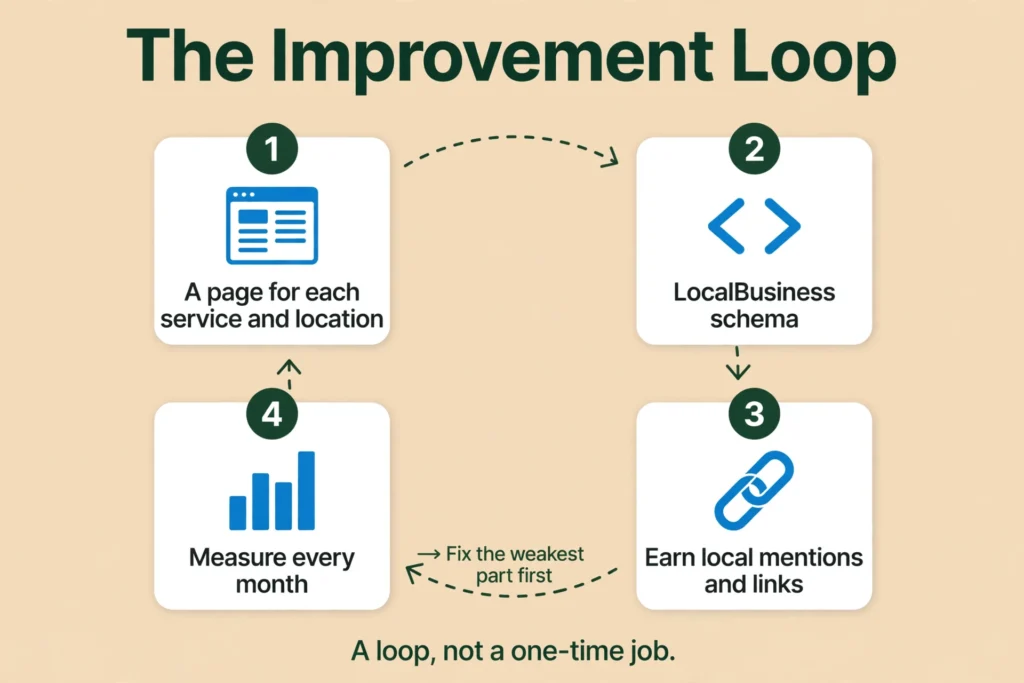
How to improve local SEO with a page for each real service and location
Your website is the second half of local SEO. The profile tells Google who you are. The website tells Google what you do and where you do it. In Whitespark’s 2026 survey of 47 local search practitioners, a dedicated page for each service ranked number one for local organic results and number two for AI visibility. That is a survey of expert opinion, not a measurement of Google’s algorithm, but it matches what Google says about people-first content: write for the reader, demonstrate real expertise, and leave them feeling they learned enough to achieve their goal. (Creating Helpful, Reliable, People-First Content)
One page per real service. Give each service you actually sell its own page. A plumber gets a drain cleaning page, a water heater page, and a leak repair page, not one page called “Services” that lists everything in two lines. Each page should say what the service is, how it works, what it costs or how pricing works, what area you cover, and what the next step is, with real photos of the work and real reviews for that service. The page should be built around the phrase customers search for, such as “drain cleaning in Dallas”, and it should answer the questions a customer would have before they call. A service page that only repeats the service name and a phone number is not useful, and it will not rank.
One page per real location. Give each real location its own page, with something true and specific about working there: the neighbourhoods you serve, a real address or service area, local photos, and local reviews. A location page must be genuinely useful to someone in that place.
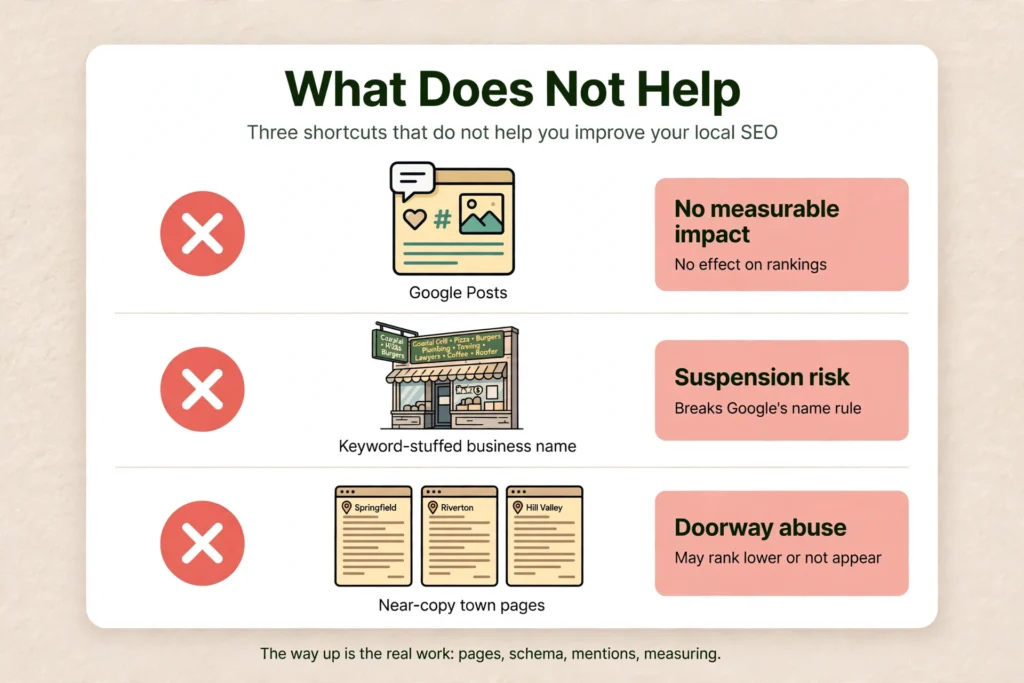
Do not build near-copy town pages. This is where owners get into trouble. Google’s spam policies call it doorway abuse when sites or pages are created to rank for specific, similar search queries, and they lead users to intermediate pages that are not as useful as the final destination. The examples Google lists include having multiple domain names or pages targeted at specific regions or cities that funnel users to one page, and creating substantially similar pages that are closer to search results than a clearly defined, browseable hierarchy. (Spam Policies for Google Web Search)
Google also calls it scaled content abuse when many pages are generated for the primary purpose of manipulating search rankings and not helping users. That is judged by purpose, not by production method, and the examples include using generative AI tools to generate many pages without adding value, and scraping or stitching content together where little value is provided. Keyword stuffing is also listed, and its examples include blocks of text that list cities and regions that a web page is trying to rank for, and repeating the same words or phrases so often that it sounds unnatural. Sites that violate these policies may rank lower in results or not appear in results at all.
The rule for owners is simple. One page per real location or per real service is fine when each page is genuinely useful. The violation is near-identical pages that only swap the city name and funnel everyone to one contact form. Never build a template with only the town name changed, and never put a footer block listing towns to rank for. A footer that lists twenty town names to catch searches is keyword stuffing, not a service area, and it can cost you rankings rather than gain them.
Service areas, and what they do and do not do. A service-area business is one that visits or delivers to customers directly but does not serve customers at its business address. Plumbers and cleaning services are Google’s examples. A service-area business can only have one profile for the whole area that it serves. A hybrid business serves customers at its business address but also directly visits or delivers to them. If your business does not have permanent on-site signage, it is not eligible as a storefront and should be listed as a service-area business. (Manage your service areas for service-area and hybrid businesses)
You can set up to 20 service areas, based on the cities, postal codes, or other areas you serve. You cannot set your service area as a radius distance around your business, so you must specify it by city, postal code, or another type of area. The boundaries of your overall area should not be more than about 2 hours of driving time from where your business is based, and you should be as specific and accurate as possible. If you do not serve customers at your business address, remove your address from your Business Profile. If approved, service area edits may take up to 48 hours to show on your profile.
Service areas do not extend where you rank. Whitespark’s 2024 service-area tests found that adding service areas made no difference to local rankings. That is a practitioner finding, not a Google statement. Google itself does not say service areas affect ranking; it says they tell customers where you work. Distance is still judged from your base location, and the ranking detail is in How to Rank Higher on Google Maps.
One profile per business per location. Do not create more than one page for each location of your business. A second profile for the same business at the same address is a duplicate by definition, and the fix is covered in How Do I Request a Duplicate Google Business Profile Be Removed or Merged?.
How to improve local SEO with LocalBusiness schema the way Google documents it
LocalBusiness schema is structured data you add to your website that tells Google about your business: its name, address, hours, phone number, and more. It helps Google understand the business, and it can help business details appear in a knowledge panel or a carousel of businesses. It is not a ranking lever, and Google does not guarantee that features using structured data will show up in search results. That is the first thing to get straight, because a lot of guides sell schema as a ranking trick. It is a way to describe your business accurately, not a way to jump the queue.
Google documents LocalBusiness schema on its Search Central page, and the rules below come from that page. (Local Business (LocalBusiness) Structured Data) It is the most technical part of how to improve local SEO, and it is also the most misunderstood.
Only two properties are required: name and address. You must include the required properties for your content to be eligible to display as a rich result. Google says to include as many properties as possible, because the more properties you provide, the higher the quality of the result for users. But the minimum is the business name and a postal address.
Use the most specific subtype. Google says to use the most specific LocalBusiness subtype possible, for example Restaurant, DaySpa, or HealthClub. If a business has multiple types, specify them as an array. Google’s own example is "@type": ["Electrician", "Plumber", "Locksmith"], which matches a multi-trade home-service business exactly. A plumber who also does electrical work should list both types that way, rather than picking the vaguer “LocalBusiness” for everything.
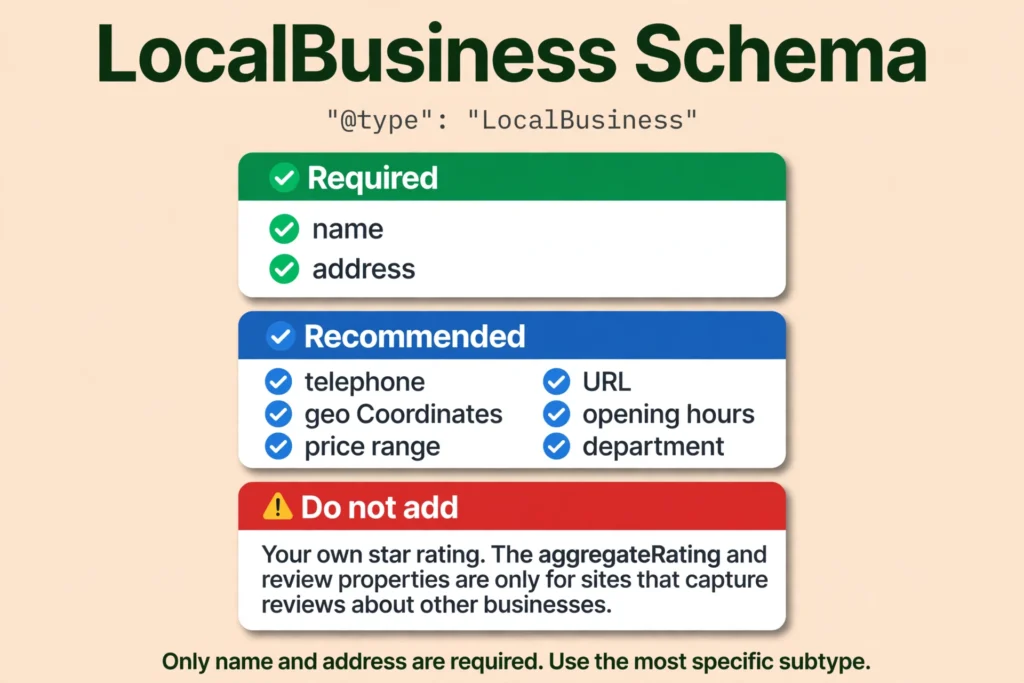
Recommended properties worth adding. The telephone number, which should be the primary contact method for customers, and must include the country code and area code. The URL, which must be the fully qualified URL of the specific business location, and must be a working link. The geo coordinates, latitude and longitude, with precision of at least 5 decimal places. The opening hours, with opens and closes in hours, minutes, and seconds, the day of the week, and valid from and valid through dates for seasonal closures. The price range, which must be shorter than 100 characters, because if it is 100 characters or longer, Google will not show a price range. A department, as a nested LocalBusiness, for a single department inside the business. A menu, for food establishments only, and serves cuisine, for restaurants only.
Do not put your own star rating in the schema. The aggregateRating and review properties in LocalBusiness markup are only recommended for sites that capture reviews about other local businesses. A business must not put its own star rating in its own LocalBusiness markup. That is a misuse of the property, and it can get the markup ignored.
Validate it and be patient. Validate the markup with Google’s Rich Results Test. The page must be accessible to Google and not blocked by a robots.txt file, a noindex tag, or login requirements. Use the URL Inspection tool in Search Console to test how Google sees the page. Allow time for re-crawling and re-indexing, because it may take several days after publishing a page for Google to find and crawl it. You can add LocalBusiness structured data to any page on your site, though Google says it may make more sense to put it on a page that contains information about your business, such as the homepage or the contact page.
If you cannot edit your website’s code, a web developer can add this in under an hour, and it only needs to be done once per location, then updated when your hours or details change. If you would rather have it handled for you, see GBP management.
How to improve local SEO by earning local mentions and links
Prominence, one of Google’s three ranking factors, is based partly on how many websites link to your business. That is Google’s own wording. (Tips to improve your local ranking on Google) Links and mentions from other local websites are how you build prominence, and they are the slowest part of how to improve local SEO to build. They are also the part most owners skip, because it cannot be done in an afternoon.
What counts as a local mention or link. A mention in a local news story, a listing on your chamber of commerce website, a trade association member page, a supplier or manufacturer page that lists you as a dealer or installer, a local blog that recommends you, a community organisation you support, a local event page that names you as a sponsor. A citation, a directory listing with your name, address, and phone, is also a mention. The citation work, how to do local listing in SEO without paying an agency, is covered in Part 1, How to Do Local SEO, and in full in What Are Local SEO Citations. Article 10, the Citations deep dive, is not published yet, so that link resolves when Article 10 publishes at that slug; re-check it at Article 10 publish time.
How to earn them. Do real work worth mentioning, and then make it easy for people to mention you. Join the chamber of commerce and the trade associations for your trade, and make sure your member listing is complete and links to your website. Sponsor a local youth team or a community event, and ask for your name and a link on the event page. Ask your suppliers and manufacturers to list you on their dealer or installer pages. If you do a notable job, a community project, or a free repair for someone in need, pitch it to a local news site or a local blog, with photos and a real story, not a press release. Write a genuinely useful page on your own site that other local sites want to link to, such as a guide to a local regulation, a seasonal maintenance checklist for your area, or a clear explanation of a common problem. Keep your business information accurate on those pages, because a mention with the wrong phone number does you no good.
What not to do. Do not buy links, do not join link schemes, and do not trade links with unrelated websites to inflate your count. Google’s spam policies cover link spam, and the links that matter are the ones you earn by being a real business in a real place. (Spam Policies for Google Web Search)
How much this matters. In Whitespark’s 2026 survey, links carry about 8 percent of local-pack weight, and citations carry about 6 to 7 percent for the map pack. For AI visibility, citations carry about 13 percent of weight, and 3 of the top 5 AI visibility factors are citation-related. Darren Shaw’s summary is that in AI search, mentions are the new link. That is practitioner evidence, not Google, but it explains why accurate listings matter beyond Google: when AI tools recommend a local business, they draw on the same mentions. Use of ChatGPT and other AI tools for local recommendations rose from 6 percent to 45 percent in BrightLocal’s 2026 survey, becoming the third most popular source of business recommendations. A business whose name, address, and phone are consistent across the web is easier for both Google and AI tools to recommend.
How to measure and improve your local SEO every month
Local SEO is not a job you do once. Measure it every month, on the same day, and compare it with the previous month. Two free tools do this: the Business Profile Performance report and Google Search Console. Together they tell you whether customers are finding you, what they do when they find you, and whether your website is showing up for the searches that matter. Measuring is the last of the seven steps, and it closes the loop on how to improve local SEO: without it, you are guessing.
Business Profile Performance. Performance data is available only for verified Business Profiles, and to check it you must be signed in to the Google Account associated with your profile. Performance data gives you insight into how people discover your Business Profile, highlights how customers use Search and Maps to find your profile, and shows what actions they take once they do. (Understand your Business Profile performance and insights)
To check it, go to your Business Profile, click Performance, select a time period, and click Apply. On the Google Maps app, open the app, tap Business at the bottom right, tap See more next to Performance, select a time period, and tap Apply. You can set a date range to track performance over a period of time, and you can download the data as a spreadsheet from Business Profile Manager, under Actions and then Insights, for one or multiple profiles at once.
The metrics, in Google’s own words, are: interactions, a summary of all your total interactions; searches, the search terms people used to find your business, updated at the start of each month, and it might take up to 5 days to show up; views, how many people viewed your Business Profile on Search and Maps; directions, how many people asked for directions to your business; calls, the number of times a customer clicked on the call button on your Business Profile, and you need to add your phone number to track this metric; and website clicks, the number of times people clicked on the website link on your Business Profile. Only metrics that apply to your business appear, and not all metrics are available to you. Performance data includes views, searches, and actions from both organic search results and Google Ads.
There is also a separate Insights feature, which gives data-driven recommendations to optimise your Business Profile and help your business grow. It may not be available for all Business Profiles, and it is created based on public, location-based information such as customer reviews, photos, and local search trends.
Search Console Performance report. The Performance report shows important metrics about how your site performs in Google Search results. You can use it to see how your search traffic changes over time, where it is coming from, and what search queries are most likely to show your site, to learn which queries are bringing traffic to your site, and to see which pages have the highest and lowest click-through rate from Google search results. (Search Console Performance report)
The default view shows click and impression data for your site in Google Search results for the past three months. The metrics are: clicks, the number of times a user clicked your site from Google Search results; impressions, how many times your site appeared in Search results; CTR, the click-through rate, which is the click count divided by the impression count; and average position, the average position of the topmost result from your site. You can group the table by queries, pages, countries, devices, search appearance, or dates. Note that even if a query appears in your list, you might not see your site in results if you run the same query yourself, because search results are specific to the time, place, device, and recent history of the person searching. The newest data can be preliminary, meaning it is still being collected and might change in the next few hours.
What to look for each month. Are calls and direction requests rising, or flat? Which search terms bring people to your profile, and do they match the services you actually sell? Which pages on your website get the most clicks, and which ones appear in search a lot but get few clicks? A page that appears often but gets few clicks usually has a title or meta description that does not match what the searcher wants. That is how to improve local SEO CTR: rewrite the title and description so they match the search, and make sure the page answers it. If you want to know how to improve local SEO rankings, start by measuring, then fix the weakest part first, whether that is the profile, the reviews, or a page that does not answer the search.
What not to do. Do not check daily and react to every small change, because daily numbers are noisy and the newest data is preliminary. Check once a month, write down the numbers, and compare with the previous month. If you want to know how to improve your local SEO, the monthly numbers are where you start: they show you the weakest part, and that is the part to fix first. Search Console also has a Generative AI features report, in beta, that shows when your pages appear in Google’s AI features, which is worth a look if you want to track AI visibility alongside the regular search numbers. Do not expect a single change to move the numbers overnight. The timeline section below covers that.
What does not help you improve local SEO
Some of the most repeated advice about local SEO does not work. Here is what the evidence actually says, for the items that matter when you are trying to improve.
Google Posts do not move rankings. Google’s own ranking tips page does not mention Google Posts at all. The only published test, by Sterling Sky in July 2021, tracked three listings, one Google Post per week for nine weeks, and 441 keywords per location, and found no measurable impact on rankings in the local pack. Joy Hawkins, asked in April 2024 whether there was evidence posts impact rankings, said: “Not that I have ever seen.” In Whitespark’s 2026 survey, post signals rank near the bottom of the local-pack list. Posts are a conversion and engagement tool, not a ranking tool. All of this is practitioner evidence, not a Google statement, and it is the only published evidence on the question.
Keyword-stuffing your business name does not help. It is not permitted under Google’s guidelines and can lead to suspension, as covered in the name section of How to Rank Higher on Google Maps. It does not move you up. It risks the profile.
Fake, paid, or incentivised reviews do not help. They are banned, and the restrictions are covered in Part 1, How to Do Local SEO: no new reviews for a set period, existing reviews unpublished, and a public warning on the profile. They do not help you rank. They can take away your ability to receive reviews at all, and they can cost you money under the FTC rule.
Geotagged photos do not help. Practitioner Darren Shaw calls geotagging photos one of those absolutely stupid myths. There is no Google confirmation that geotagged photos affect ranking, and the claim should not be presented as one.
Keywords in your Business Profile description do not help, as far as anyone can show. Practitioner Darren Shaw says Google does not use the description in the ranking algorithm. Google has not confirmed this either way, so treat it as a practitioner observation, not a Google rule. Write the description for customers, not for the algorithm.
One page per town does not help. Near-identical pages that only swap the city name are doorway abuse under Google’s spam policies, and they may rank lower or not appear at all. A footer block listing towns to rank for is keyword stuffing. Each location page must be genuinely useful and backed by real work in that place.
Embedding a Google Map on your website does not help you rank. No Google source says this, and no named-practitioner test was found. It is a convenience for customers who want to see where you are, not a ranking factor.
LocalBusiness schema is not a ranking lever. It helps Google understand your business, and it may help details appear in a knowledge panel or carousel, but Google explicitly says it does not guarantee that features using structured data will show up. Do not let anyone sell you schema as a shortcut to the top.
Paying for a ranking does not work. Google’s own words are: “There’s no way to request or pay for a better local ranking on Google.” Google Maps Help says results in Google Maps are not influenced by payment from other companies, and paid content in Google Maps is labelled. (Tips to improve your local ranking on Google; Google Maps Help, Search for nearby places) Google Ads and Local Services Ads are separate paid products that appear in labelled ad slots. They do not change the organic local-pack order. If someone offers to rank you number one for a fee through a back door, there is no back door. The steps are the free ones in this article, or a support case.
None of these shortcuts is how to improve local SEO. The way up is the work in the sections above.
How long does it take to improve local SEO?
Google publishes no fixed timeline for SEO results, and anyone who gives you a fixed date is guessing, or selling a guarantee Google does not offer.
Google’s own words, from its SEO Starter Guide, are the ones to use: “Every change you make will take some time to be reflected on Google’s end. Some changes might take effect in a few hours, others could take several months. In general, you likely want to wait a few weeks to assess whether your work had beneficial effects in Google Search results. Keep in mind that not all changes you make to your website will result in noticeable impact in search results.” (SEO Starter Guide: The Basics) That is deliberately vague: hours to several months, wait a few weeks to assess, and not every change produces a visible effect. Do not tighten it into a promise.
One figure you may see quoted is “Google says SEO takes four months to a year”. That sentence used to be on Google’s page about hiring an SEO, and Google removed it in the June 2026 update. Do not cite it as current Google guidance, because it is no longer on Google’s page.
Practitioners who track this report a range, and these are estimates, not guarantees. Profile and category fixes can show movement in 1 to 3 weeks for low-competition terms. Map-pack visibility in 2 to 8 weeks for a claimed, verified, complete profile in a non-competitive market. Prominence-driven gains, reviews and citations against established competitors, typically take 2 to 4 months. A stable top 3 in competitive keywords takes 4 to 6 months. Website and organic rankings take 6 to 12 months. A BrightLocal survey found that 28 percent of SEO professionals reported noticeable ranking movement within the first month, and 65 percent said tangible lead generation typically began between the 3 and 6 month mark. That is a survey of practitioners, not a Google figure.
The honest answer is that the timeline depends on how competitive your trade and your city are, how complete your profile is, and how much prominence you still need to build. A plumber in a small town with two competitors will see movement faster than an HVAC company in a large metro area with fifty. Start with the profile fixes, because those are the fastest, and treat prominence as work that compounds over months. If you want to know how to improve local SEO results, the order in this article is the order to do the work in, and the monthly measurement is how you will know it is working.
What to do next to improve your local SEO
Work in this order. Give each service you actually sell its own genuinely useful page, and give each real location its own genuinely useful page, and do not build near-copy town pages or footer town lists. Add LocalBusiness schema the way Google documents it. Earn mentions and links from other local websites. Then measure it every month, in the Business Profile Performance report and in Search Console, and fix the weakest part first. If any part of the setup is missing, the profile is not verified, the information is not complete, or the name, address, and phone do not match everywhere, go back to How to Do Local SEO and finish that first. The improvement work does not lift a profile that is not finished.
That is how to do local SEO marketing the way Google describes it: people-first content, accurate information, real reviews, and steady work over months, not shortcuts. If you want a second pair of eyes on the whole setup, Axiom’s free audit looks at the profile, the categories, the reviews, the website pages, and the wrong directory details together, and tells you what to fix first. If you would rather have the profile watched for you, so a wrong edit or a new duplicate gets caught fast, see GBP management.
FAQ: how to improve local SEO
Start with the services you sell and the places you serve, and list the phrases customers would type, such as “plumber in Dallas” or “drain cleaning near me”. Check what Google suggests as you type, and look at the People also ask box and the related searches at the bottom of the results page. Use a keyword tool, such as Semrush or Google Keyword Planner, to see how many people search each phrase per month. Pick the phrases with real search volume that match the work you actually do, and give each service its own page built around its phrase. Do not chase keywords for work you do not do or places you do not serve, because a page that does not match the search will not rank and will not bring you the right calls.
Give each real location its own verified Business Profile, each with its own address, or as a service-area profile if you do not serve customers at that address. Give each location its own genuinely useful page, with real details about the work you do there, not a template with only the town name changed. Keep the name, address, and phone identical everywhere for each location, and give each location its own reviews and its own LocalBusiness schema with that location’s address. If a location is only a mailbox or a virtual office, it is not eligible for a profile. Do not create extra profiles for the same location, because a second profile for the same business at the same address is a duplicate, and the fix is covered in How Do I Request a Duplicate Google Business Profile Be Removed or Merged?.
Research means three things. First, what customers search: do keyword research for the services you sell and the places you serve, as covered in the question above. Second, what your competitors show up for: open the map pack and the top organic results for your main searches, and note their profile completeness, their review count and recency, their categories, and what their pages cover that yours do not. Third, where your business stands now: check your Business Profile Performance report for views, calls, and direction requests, and check Search Console for the queries, clicks, and positions your website already has. Do this research before you start fixing things, and repeat it every month to see what moved.
An audit is a check of the whole setup, in order. First, is the profile claimed and verified? Second, is the information complete and accurate, including the name, address, phone, hours, categories, and photos? Third, is the name, address, and phone identical on the website, the profile, and the listings? Fourth, how many reviews do you have, how recent are they, and are you replying to them? Fifth, does each service and each location have a genuinely useful page, with no near-copy town pages or footer town lists? Sixth, is LocalBusiness schema present and valid, checked with Google’s Rich Results Test? Seventh, what do the Business Profile Performance report and Search Console show for the last three months? Fix what the audit finds, in that order. That is how to improve local SEO: the audit shows the weakest part, and you fix that first. If you would rather have it done for you, Axiom’s free audit covers the profile, the categories, the reviews, the website pages, and the directory details together: Get My Free Audit.
CTR is your click-through rate, the clicks divided by the impressions, as Search Console reports it. Open the Performance report and look at which pages and queries have the lowest CTR, because that tells you where people see you and do not click.
The fix is what the searcher sees. Give each page a title that says exactly what the service is and where you do it, and a description that matches what the searcher is looking for. On the profile side, keep the information complete and accurate, add recent photos, and keep reviews coming in, because the profile is what people compare in the map results.
Check it every month. If a page gets plenty of impressions and almost no clicks, the title or the description is the problem, not the ranking. Fix that first.
Read your reviews every week and look for the same point coming up again and again. If three customers mention slow replies or a missed call, that is the problem to fix first, because it is costing you calls and it will keep showing up in your reviews.
Reply to every review, good and bad. Google’s own guidance is to keep replies short, professional, and personal, and to answer the specific point the customer raised instead of sending the same thank you to everyone. Most customers expect a reply, and a business that answers every review is more likely to be chosen.
Ask for reviews the right way, with Google’s review link or QR code after the job is done. Never offer a discount or a freebie for a review, because Google treats that as fake engagement and can remove the reviews. The reviews you earn this way are the feedback to act on next month.
See What This Looks Like for Your Business
Free audit, real numbers, no obligation. We’ll show you exactly where you stand and what it would take to rank #1 in your market.
📋 Get My Free Audit →