How to Do Local SEO
The short answer: how to do local SEO
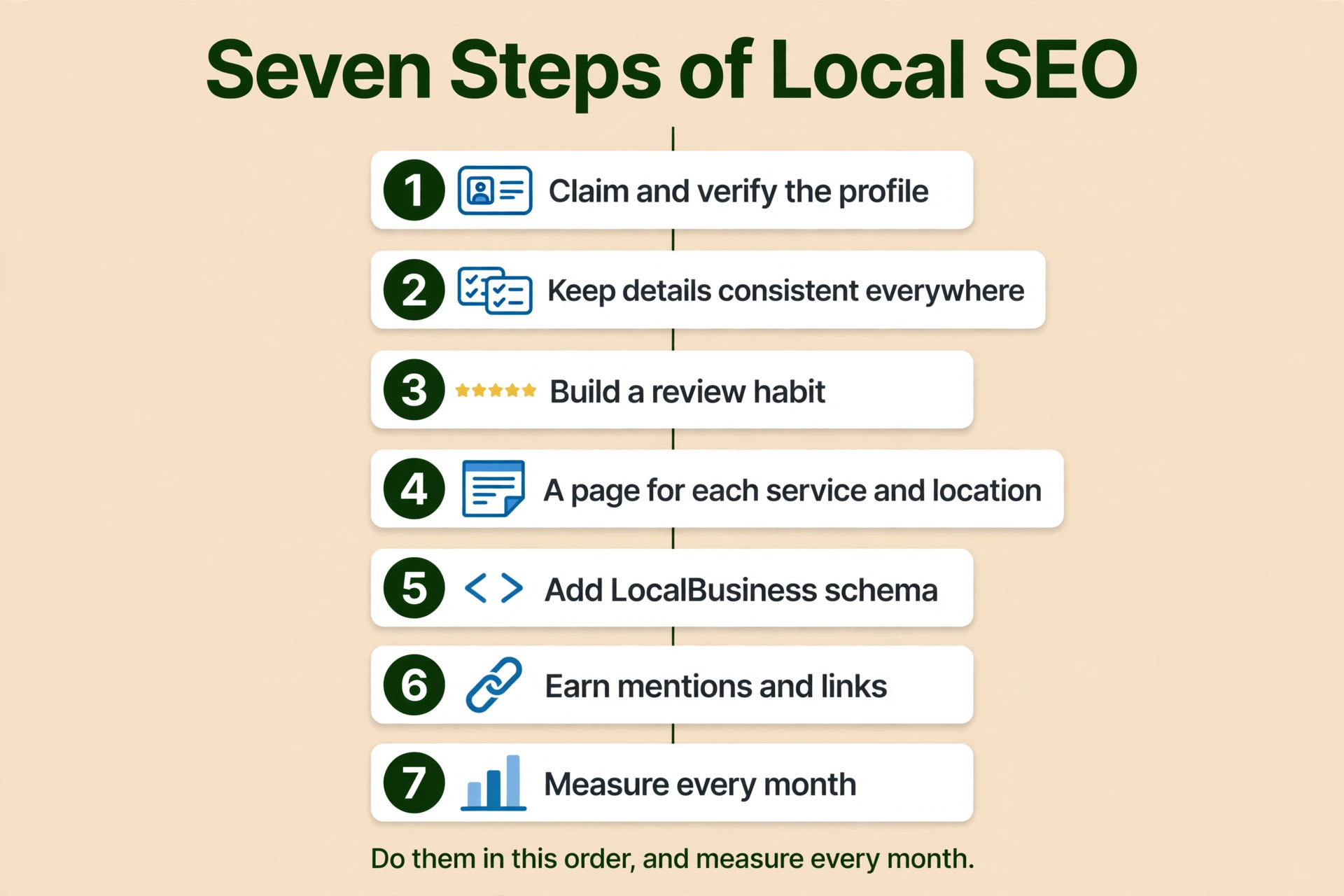
Here is how to do local SEO: claim and verify your Google Business Profile, keep your name, address, and phone identical on your website, your profile, and your listings, build a steady flow of real reviews, give each service and each location its own genuinely useful page, add LocalBusiness schema the way Google documents it, earn mentions and links from other local websites, and measure it every month. That is the whole job, in the order you do it, and the sections below work through each part.
Local SEO is the work that makes a local business show up when people nearby search Google for what it does. Google publishes no definition of the term “local SEO”, so that definition is plain wording, not a Google quotation. Google’s own ranking guidance says local results are mainly based on three factors: relevance, distance, and prominence. (Tips to improve your local ranking on Google) Relevance is how well a Business Profile matches what someone is searching for. Distance is how far each business is from the customer who is searching. Prominence is how well known a business is. You cannot change where the searcher is standing, so the work is on relevance and prominence. The ranking detail lives in How to Rank Higher on Google Maps, and this article does not repeat it. This article covers the setup in full: the profile, the consistency, and the reviews. The improvement work, pages, schema, mentions, and measuring, is summarised here and covered in full in How to Improve Local SEO.
How to do local SEO: claim, verify, and complete your Google Business Profile
Everything in local SEO starts with the Business Profile. It is free, and it is the listing Google shows in Search and Maps. Without a verified profile, the rest of the work has nothing to attach to. If you only do one thing in this article, do this one, because it is the foundation of how to do local SEO.
Claim or create the profile. If a Business Profile for your business does not exist on Search or Maps, you can create one. Go to business.google.com/add, click Add your business to Google, follow the on-screen instructions to add your details, and select a verification option. (Add or claim your Business Profile) Google says you can add or claim your business at no charge. If a profile already exists but is unverified, claim it from Google Maps by choosing Claim this business and then Manage now, or claim it from the Google Maps app. If a profile has already been verified by someone else and you are authorised to manage the business, you request ownership from the current profile owner, and that process is covered in How to Claim a Google Business Profile Someone Else Verified. You need a Google Account to sign up for a Business Profile.
Verify the profile. To edit your business information on Google, such as your business name or business hours, and to interact with customers, you need to verify your business. Verification gives you ownership of the profile and lets you make sure the information is accurate. (Verify your business on Google)
Verification methods are automatically determined by Google and cannot be changed. The options depend on your business type, public information, region, or business hours, and in some cases you may need to verify with more than one method. The methods Google lists are phone or text, email, live video call, mail (postcard), and a video recording, and Google says that if your business is eligible for video verification, it recommends using that option.
For phone or text, make sure you can answer your business phone number or receive text messages. Automated phone menus will not receive the code. For email, make sure you can use the email address shown in the verification screen. For a live video call, which is not available for all businesses and is only available within your business hours, you must be at your business and able to show your location and ownership: outside signs, nearby businesses or a street sign, your products, branded equipment, marketing materials or tools, and proof you manage the business, such as access to employee-only areas, a cash register, a kitchen, a storage room, non-sensitive business documents, or your keys to open the facility.
For mail, a postcard is not available for all businesses. If it is offered, confirm the mailing address and request the code. Most codes arrive within 14 days. Do not edit your business name, address, or category while you wait, because if you do, the code will not work. Do not request a new code, because that invalidates the code already in the mail and sends a new one, which makes the process longer. Verification codes expire after 30 days. The code is five digits, entered on the profile. Google will never ask for your verification code, and you should not share it with anyone, even with people who manage your profile.
After you complete the verification steps, Google reviews the information you provided. Verification reviews take up to 5 business days, and on rare occasions they take longer. In some cases Google verifies a profile instantly, which can happen when you verify your website with Google Search Console, or when you use bulk verification for 10 or more locations. When your business is verified, you get a confirmation email, and after that you can add owners and managers and transfer primary ownership.
Keep your business information complete and accurate. Google says businesses with complete and accurate information are more likely to show up in local search results, and if your information is not accurate, your profile might not show up for relevant searches in your area. (Tips to improve your local ranking on Google) The fields Google names are the full address (if customers can visit), business hours including special hours, business category, and attributes such as parking or Wi-Fi. Fill in every field that applies to you, and keep it true.
If your hours are wrong, or Google has marked you closed when you are not, fix them first. See How Do I Change My Business Hours on Google?. If your profile has been marked as a duplicate, that is a different fix, covered in How Do I Request a Duplicate Google Business Profile Be Removed or Merged?.
Pick the most specific category. Google’s guidelines say to choose the fewest number of categories it takes to describe your overall core business, and to choose categories that are as specific as possible but representative of your main business. Do not use categories solely as keywords or to describe attributes of your business. (Guidelines for representing your business on Google) The test Google gives is to complete the sentence “This business IS a…” rather than “This business HAS a…”. If your business does many things, the decision is covered in detail in How Do You Pick a Primary Category When Your Business Does Many Things?.
Add photos and videos. Google lists adding photos and videos among its tips: they show customers what you offer and tell the story of your business. Add real photos of your work, your team, and your shopfront, and keep them current. Google lists photos among its tips but does not call them a ranking factor, so do not treat a photo upload as a ranking lever on its own. It is part of a complete profile, not a shortcut.
Reply to reviews. Google lists responding to reviews among its tips, and the review habit is covered in its own section below.
The ranking detail, the three factors in full, the name rule, and the service-area rules are covered in How to Rank Higher on Google Maps. That article is the companion to this one. Do the profile work here first, then read it for the ranking detail.
How to do local SEO with the same name, address, and phone everywhere
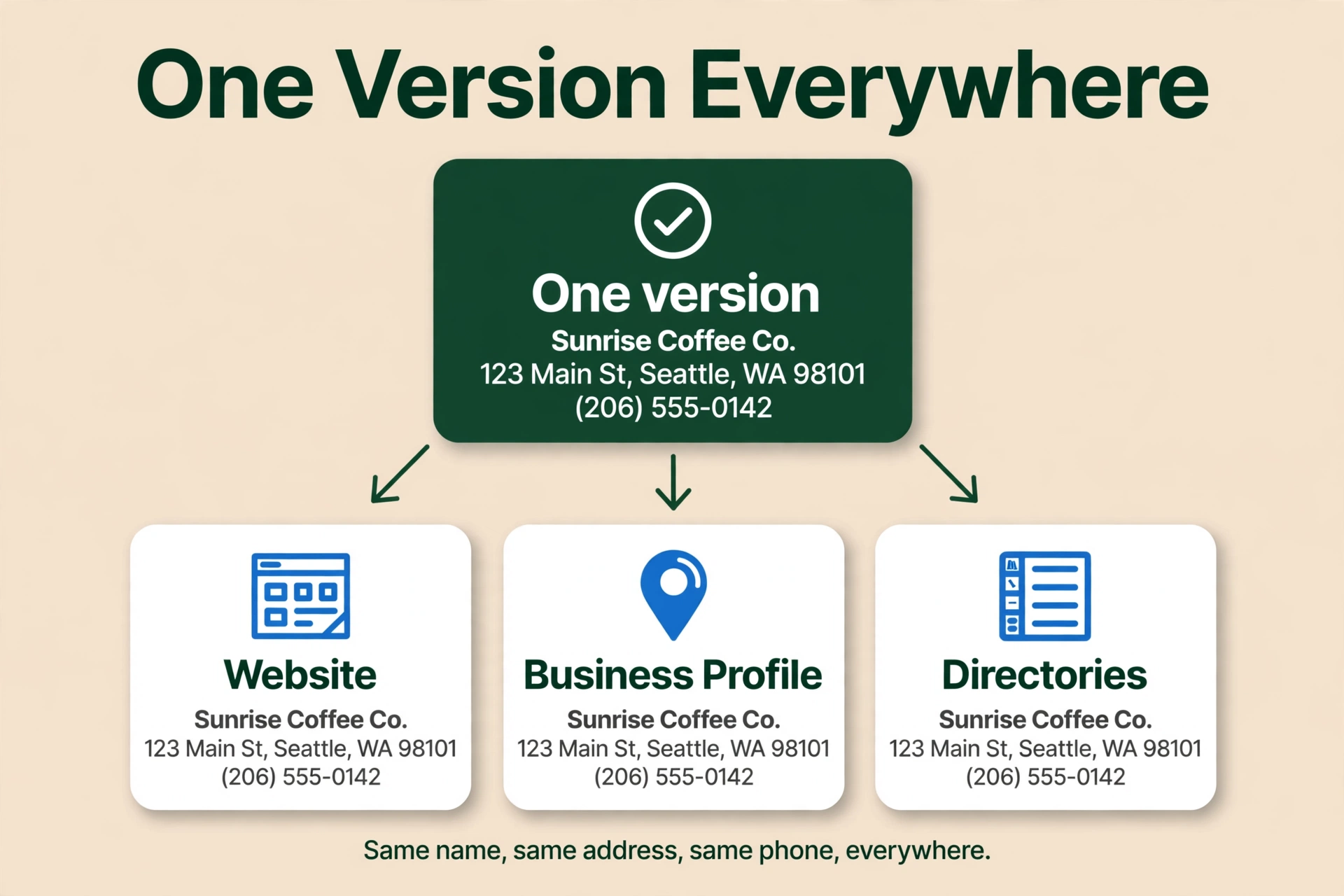
Your name, address, and phone number, usually shortened to NAP, must be identical on your website, your Business Profile, and every listing. Pick one exact version and use it everywhere, down to the punctuation and the phone number format.
This is a practitioner rule, not a Google-stated ranking factor. Google’s ranking guidance does not use the words “citation” or “NAP consistency” anywhere. What Google does say is that prominence is based partly on how many websites link to your business, and that your business information must match the real world. The consistency habit comes from practitioners, and it is backed by Whitespark’s 2026 survey of 47 local search practitioners: the absence of crawlable NAP on the website ranks among the top negative factors for the local pack, and an HTML NAP that matches the profile ranks 15th among local-pack factors. That is survey evidence, not a Google statement, but it lines up with common sense. If Google and your customers see three different phone numbers for the same business, neither of them is sure which one is right.
Start with one version. Write down the exact business name as it appears in the real world, the exact address as the post office writes it, and one phone number. That is the version everything else must match. If your legal name includes a suffix such as LLC, and you use it on your storefront and stationery, keep it. If you do not use it in the real world, do not add it to the listings. A tracking number that differs from the number on your profile is a mismatch, and Whitespark’s survey ranks mismatched NAP and tracking numbers among the top negative factors. If you use call tracking, route it so the number customers see stays the one on your profile, or accept that the mismatch is a risk.
Fix the website first. Put the name, address, and phone on your website as crawlable text, not only inside an image or a map embed that Google cannot read. The footer and the contact page are the natural places, and the address should also appear on the homepage. Then check the Business Profile and make it match the website exactly, character for character. Then work through the listings.
What a citation is. A citation is any online mention of your business’s name, address, and phone number, on a directory, a review site, a map, a social profile, or another website. Structured citations are listings on directories. Unstructured citations are mentions in articles, blog posts, or local news. Citations get only a short section here because Article 10, What Are Local SEO Citations, is the deep dive. Read it after this article if you want the full citation work.
Where to fix them, in order. Claim the core listings first, all free, all with the same fixed version of your details: Google Business Profile, Apple Business Connect, Bing Places, Yelp, Facebook, and the Better Business Bureau. Then the data aggregators, which are companies that collect business data and resell or syndicate it to hundreds of apps, maps, navigation systems, and directories. The three US aggregators still operating in 2026 are Data Axle, TransUnion Digital Business Profile, and Foursquare. The old names are dead: Acxiom’s business listings product closed at the end of 2019, Infogroup is now Data Axle, Neustar Localeze is now TransUnion Digital Business Profile, and Factual is now part of Foursquare. Do not submit to the old names. After the aggregators, add a few industry directories for your trade and a few city directories for your area.
How to do local listing in SEO without paying an agency: claim the free listings, use one version of your details, and fix the aggregators first, because they feed the sites you will never touch directly. Changes take weeks to months to reach every site that buys aggregator data, and practitioner guides put it at 30 to 90 days, or 4 to 8 weeks. Do this step early in a cleanup, and do not promise yourself instant fixes.
Tools exist to find and fix citations, including BrightLocal Citation Tracker and Citation Builder, Whitespark Local Citation Finder, and Moz Local. They are tools, not requirements, and their prices change, so they are not quoted here. A spreadsheet and a free afternoon will do the same job for a business with one location.
What not to do. Do not add a keyword-stuffed version of your business name to listings. Adding keywords that are not part of your real name breaks Google’s name guideline and can get the profile suspended, and the fix is covered in Google Business Profile Suspended, Reinstated, Then Suspended Again? How to Break the Loop. Do not list a different phone number on a directory than the one on your profile. Do not pay a service to blast your business onto hundreds of low-quality directories. A few accurate listings beat a hundred sloppy ones. Keeping your details the same everywhere is also listed among the common Google Business Profile mistakes to avoid, and the full consistency checklist is on the NAP consistency page. Get this habit right and the rest of how to do local SEO gets easier, because Google and your customers are working from the same details.
How to do local SEO by building a review habit the legal way
Reviews are the part of how to do local SEO that customers see first, and they feed prominence, which is one of Google’s three ranking factors. Google says so plainly: more reviews and positive ratings can help your business’s local ranking. (Tips to improve your local ranking on Google)
The numbers for why this matters come from BrightLocal’s Local Consumer Review Survey 2026, a survey of 1,002 US adults, not from Google. 97 percent of consumers read reviews for local businesses, and 41 percent always read them when browsing for businesses. 47 percent will not use a business with fewer than 20 reviews, and only 9 percent are willing to use one with five or fewer. 89 percent of consumers expect business owners to respond to reviews, and 80 percent are more likely to use a business that responds to every review. Star ratings matter too: 92 percent care about them, 31 percent will only use a business with 4.5 stars or more, and 68 percent will only use a business with four or more stars. The single most important thing in a review, for 56 percent of consumers, is consistent sentiment across multiple reviews. These are consumer-behaviour figures, not ranking factors, but they are the reason the review habit is worth the effort.
Ask every happy customer. To make it easier for customers to leave reviews, you can create and share a link or QR code to request reviews. Go to your Business Profile, select Read Reviews, then Get more reviews, and copy the link or download the QR code. Review QR codes can only be generated on a computer browser, not on a mobile device. (Create a Google link or QR code to request reviews) Google suggests including the link or QR code on receipts, in thank-you emails, at the end of a chat interaction, and printed and displayed in your store. You can also send review requests through email, a WhatsApp message, or a Facebook post.
Ask after a job well done, while the customer is still happy, and make it easy by sending the link directly. A steady flow of new reviews over time is worth more than ten reviews in one week followed by silence. That is a practitioner observation from people who track local rankings, not a Google rule, but it follows from how prominence works: a business that keeps earning reviews looks alive, and a business whose reviews stopped two years ago does not. Recency matters to customers as well: in BrightLocal’s 2026 survey, 74 percent only care about reviews written in the last three months, 32 percent look for reviews written in the last two weeks, and 18 percent are only swayed by reviews written within the last week.
Reply to every review. Google’s guidance for replies is simple: be professional and polite; keep it short and simple, because customers value direct and honest responses; make your replies count, instead of sending the same thank you to everyone, focus on reviews where you can share a helpful update or answer a question; and be conversational, not promotional, because your reviewers are already customers, so avoid using your response to offer deals or promotions, and instead share a detail that reinforces their experience and encourages a return visit. (Tips to get more reviews)
Timing matters. In BrightLocal’s 2026 survey, 19 percent of consumers expect a same-day response, 32 percent by the following day, and 81 percent within a week. 42 percent are unlikely to use a business that ignores its reviews entirely, and 50 percent are put off by templated or generic responses. Write each reply for the person who wrote the review, and mention something specific from their job.
Negative reviews are an opportunity, not a disaster. Google says negative reviews are not necessarily a sign of poor business practices. Instead, they provide a valuable opportunity to understand customer expectations and improve future experiences. If you believe a review violates Google’s content policies, you can flag it. When you reply to a negative review, protect privacy and avoid personal attacks, never share a reviewer’s private information, be honest and explain limitations, apologise when appropriate and show empathy, personalise your reply by addressing the reviewer by name and acknowledging their specific feedback, and respond in a timely manner. A calm, specific reply to a complaint does more for a future customer than a page of five-star reviews with no replies at all.
What is banned, and what happens. Reviews and other user contributions to Google Maps must reflect a genuine experience. Offering incentives, like free or discounted goods or services, to customers in exchange for reviews is considered fake engagement and is strictly prohibited. That includes posting reviews, changing reviews, or removing negative reviews in exchange for an incentive. (Create a Google link or QR code to request reviews)
Google’s Maps User Generated Content Policy says fake engagement is not allowed and will be removed. That includes reviews or ratings that have been paid for, directly or in kind; content posted from multiple accounts by or at the request of one person; and content posted using an emulator or other device-tampering service. Merchants may not offer incentives, payment, discounts, or free goods or services in exchange for posting, revising, or removing a review. They may not selectively solicit only positive reviews, discourage or prohibit negative reviews, or pressure users to leave ratings while on the premises. What merchants may do is solicit content that represents a genuine experience, without offering incentives or trying to influence the rating. (Maps User Generated Content Policy)
A profile caught with fake or incentivised reviews faces more than removal. Google says businesses that violate its Fake Engagement policy may be subject to restrictions in addition to having the violating reviews removed. The restrictions Google lists are: the profile will not be able to receive new reviews or ratings for a set period of time; the profile’s existing reviews or ratings will be unpublished for a set period of time; and the profile will display a warning to let consumers know that fake reviews were removed. Google says it will notify business owners by email if it plans to apply a restriction, and businesses have the ability to appeal the decision. Google does not publish how long a restriction lasts. (Business Profile restrictions for policy violations)
Buying reviews is also against the law in the United States. The FTC’s Consumer Reviews and Testimonials Rule, in effect since October 2024, bans buying positive or negative reviews, with civil penalties of up to $53,088 per violation. Each fake review can count as a separate violation.
Google reported removing over 13 million fake Business Profiles in 2025, in its April 16, 2026 blog post about protecting businesses on Maps. The way to build reviews is to ask real customers after a job well done, and to reply to the reviews that come in.
How to do local SEO with a page for each real service and location
Your website is the second half of how to do local SEO. The profile tells Google who you are. The website tells Google what you do and where you do it. Give each service you actually sell its own page, and give each real location its own page, with something true and specific about working there. In Whitespark’s 2026 survey of 47 local search practitioners, a dedicated page for each service ranked number one for local organic results and number two for AI visibility. That is survey evidence, not a Google measurement, but it matches Google’s people-first guidance: write for the reader and demonstrate real expertise.
Do not build near-copy town pages. Google’s spam policies call it doorway abuse when pages are created to rank for specific, similar search queries and lead users to intermediate pages that are not as useful as the final destination. Near-identical pages that only swap the city name and funnel everyone to one contact form may rank lower or not appear at all. Never put a footer block listing towns to rank for. That is keyword stuffing. A service-area business can only have one profile for the whole area it serves, and you can set up to 20 service areas, but you cannot set one as a radius, and service areas do not extend where you rank. The full detail, including the doorway examples, the service-area rules, and what a genuinely useful page looks like, is in How to Improve Local SEO.
How to do local SEO with LocalBusiness schema the way Google documents it
LocalBusiness schema is structured data you add to your website that tells Google about your business: its name, address, hours, phone number, and more. It helps Google understand the business, and it can help details appear in a knowledge panel or a carousel. It is not a ranking lever, and Google does not guarantee that features using structured data will show up. Only two properties are required: name and address. Google says to use the most specific LocalBusiness subtype possible, and its own example for a multi-trade business is [“Electrician”, “Plumber”, “Locksmith”]. Do not put your own star rating in the schema, because the aggregateRating and review properties are only for sites that capture reviews about other businesses. Validate the markup with Google’s Rich Results Test. The full detail, including the recommended properties, where to put the markup, and how to validate it, is in How to Improve Local SEO.
How to do local SEO by earning local mentions and links
Prominence, one of Google’s three ranking factors, is based partly on how many websites link to your business. Links and mentions from other local websites are how you build prominence, and they are the slowest part of local SEO to build. A mention in a local news story, a listing on your chamber of commerce website, a trade association member page, a supplier page that lists you as a dealer, or a local blog that recommends you all count. A citation, a directory listing with your name, address, and phone, is also a mention. Do not buy links or join link schemes. In Whitespark’s 2026 survey, links carry about 8 percent of local-pack weight, and citations carry about 13 percent for AI visibility. Darren Shaw’s summary is that in AI search, mentions are the new link. Use of ChatGPT and other AI tools for local recommendations rose from 6 percent to 45 percent in BrightLocal’s 2026 survey. The full detail, including how to earn mentions and what counts, is in How to Improve Local SEO.
How to measure your local SEO every month
Local SEO is not a job you do once. Measure it every month, on the same day, and compare it with the previous month. Two free tools do this: the Business Profile Performance report and Google Search Console. The Performance report shows views, searches, calls, directions, and website clicks on your profile. Search Console shows clicks, impressions, click-through rate, and average position for your website. Look for whether calls and direction requests are rising, which search terms bring people to your profile, and which website pages get the most clicks. A page that appears often but gets few clicks usually has a title or meta description that does not match what the searcher wants. Do not check daily and react to every small change, because daily numbers are noisy and the newest data is preliminary. The full detail, including how to check each report, what each metric means, and what to look for each month, is in How to Improve Local SEO.
What does not help your local SEO
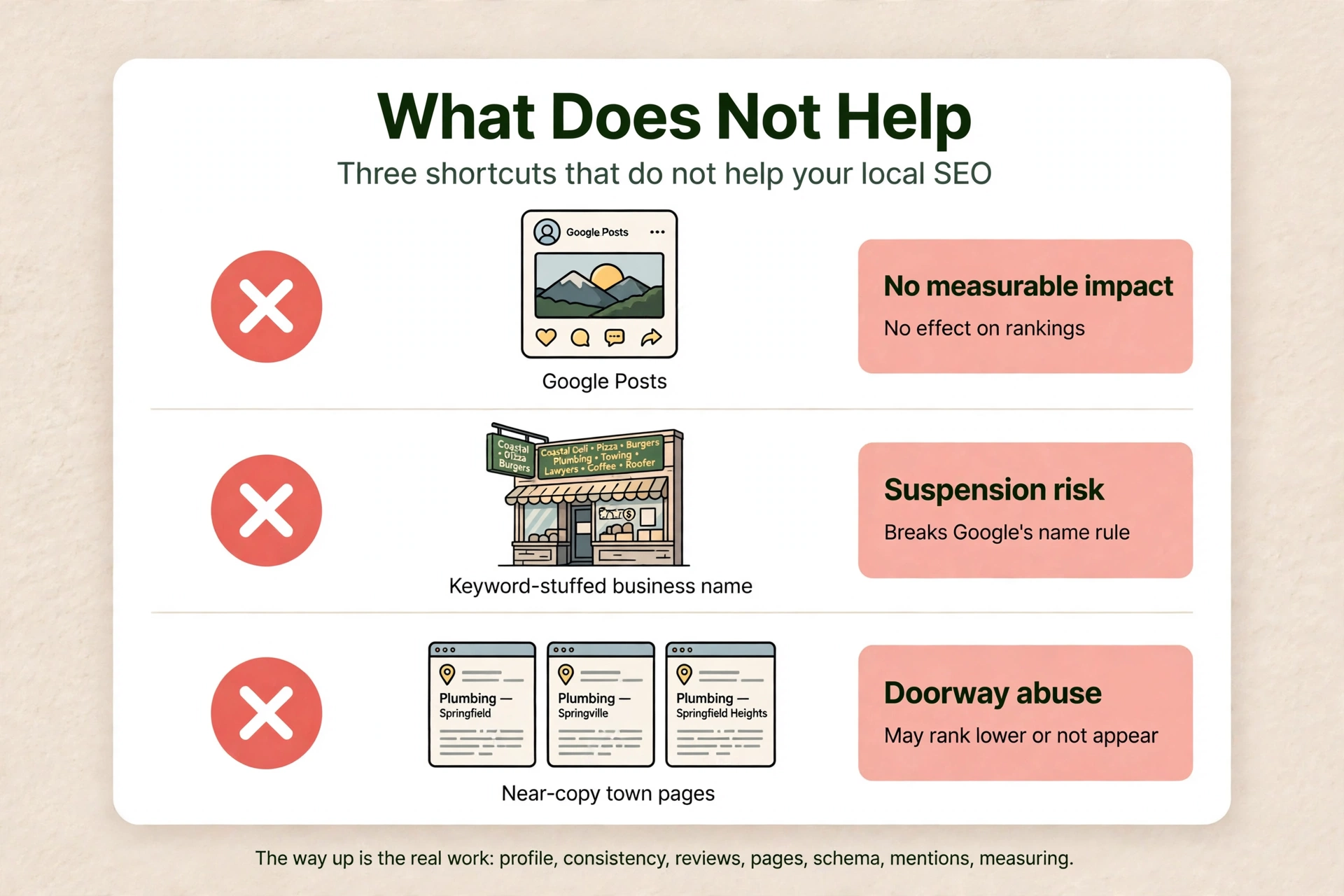
Some of the most repeated advice about local SEO does not work. Google Posts do not move rankings. Google’s ranking tips page does not mention them, and the only published test, by Sterling Sky in July 2021, found no measurable impact on rankings in the local pack. Keyword-stuffing your business name does not help. It breaks Google’s name guideline and can lead to suspension. Fake, paid, or incentivised reviews do not help. They are banned, and they can lead to restrictions: no new reviews for a set period, existing reviews unpublished, and a public warning on the profile, plus fines under the FTC rule. Geotagged photos do not help. Darren Shaw calls that a myth, and there is no Google confirmation. Keywords in your Business Profile description do not help as far as anyone can show. One page per town does not help. Near-identical pages that only swap the city name are doorway abuse, and a footer block listing towns is keyword stuffing. Embedding a Google Map on your website does not help you rank. LocalBusiness schema is not a ranking lever. It helps Google understand your business but does not guarantee a rich result. Paying for a ranking does not work. Google’s own words are: “There’s no way to request or pay for a better local ranking on Google.” None of these shortcuts is how to improve local SEO. The way up is the work in the sections above, and the full detail on each is in How to Improve Local SEO.
How long does it take to do local SEO?
Google publishes no fixed timeline for SEO results, and anyone who gives you a fixed date is guessing, or selling a guarantee Google does not offer. Google’s own words, from its SEO Starter Guide, are the ones to use: “Every change you make will take some time to be reflected on Google’s end. Some changes might take effect in a few hours, others could take several months. In general, you likely want to wait a few weeks to assess whether your work had beneficial effects in Google Search results. Keep in mind that not all changes you make to your website will result in noticeable impact in search results.” That is deliberately vague: hours to several months, wait a few weeks to assess, and not every change produces a visible effect. Do not tighten it into a promise.
One figure you may see quoted is “Google says SEO takes four months to a year”. That sentence used to be on Google’s page about hiring an SEO, and Google removed it in the June 2026 update. Do not cite it as current Google guidance, because it is no longer on Google’s page. Practitioners who track this report a range, and these are estimates, not guarantees. Profile and category fixes can show movement in 1 to 3 weeks for low-competition terms. Map-pack visibility in 2 to 8 weeks for a claimed, verified, complete profile in a non-competitive market. Prominence-driven gains typically take 2 to 4 months. A stable top 3 in competitive keywords takes 4 to 6 months. Website and organic rankings take 6 to 12 months. Start with the profile fixes, because those are the fastest, and treat prominence as work that compounds over months. If you want to know how to improve local SEO results, the order in this article is the order to do the work in, and the monthly measurement is how you will know it is working.
What to do next with your local SEO
Work in this order. Claim and verify the profile. Fill in complete and accurate information, and pick the most specific category for the work that pays. Put the same name, address, and phone on your website, your profile, and your listings. Ask real customers for reviews, and reply to every review that comes in. That is the setup, and it is the foundation. After that, the improvement work begins: give each service and each location its own genuinely useful page, add LocalBusiness schema, earn mentions and links, and measure it every month. That work, in full detail, is in How to Improve Local SEO. Read it next, then work through it step by step.
That is how to do local SEO marketing the way Google describes it: people-first content, accurate information, real reviews, and steady work over months, not shortcuts. If you want a second pair of eyes on the whole setup, Axiom’s free audit looks at the profile, the categories, the reviews, the website pages, and the wrong directory details together, and tells you what to fix first. If you would rather have the profile watched for you, so a wrong edit or a new duplicate gets caught fast, see GBP management.
Frequently asked questions
Local SEO is the work that makes a business show up when people nearby search Google for what it does. It is the set of steps in this article: a verified Google Business Profile, the same name, address, and phone everywhere, real reviews, useful pages for each service and location, LocalBusiness schema, and local mentions and links. Google ranks local results on relevance, distance, and prominence. Note that Google publishes no definition of the term “local SEO”, so this is a plain-word definition, not a Google quotation.
Because customers search Google before they call, and a business that does not show up when nearby customers search is invisible at the moment they decide. In BrightLocal’s 2026 survey of 1,002 US adults, 97 percent of consumers read reviews for local businesses, and 47 percent will not use a business with fewer than 20 reviews. Use of ChatGPT and other AI tools for local recommendations rose from 6 percent to 45 percent, becoming the third most popular source of business recommendations. Local SEO is what puts your business in front of those customers, on Google and in AI answers, at the moment they are choosing.
Start with the profile. Claim and verify it for free at business.google.com/add, fill in every field accurately, pick the most specific category for the work you actually do, and add real photos. Then put the same name, address, and phone on your website. Then ask real customers for reviews and reply to them. Those three steps, the profile, the consistency, and the reviews, are the foundation. After that, build a page for each service and each location, add LocalBusiness schema, and earn local mentions and links. Measure it every month with the Business Profile Performance report and Search Console. You do not need to do everything at once. The order in this article is the order to do the work in, and the first three steps alone will put you ahead of most local competitors.
See What This Looks Like for Your Business
Free audit, real numbers, no obligation. We’ll show you exactly where you stand and what it would take to rank #1 in your market.
🔍 Get My Free Audit →