How to Remove Negative Google Reviews
Short answer: You cannot delete a Google review yourself. Only the person who wrote it can delete it, or Google can remove it if it breaks Google’s review policies. A review that is unfair, wrong, or damaging is not enough on its own. It has to break a rule.
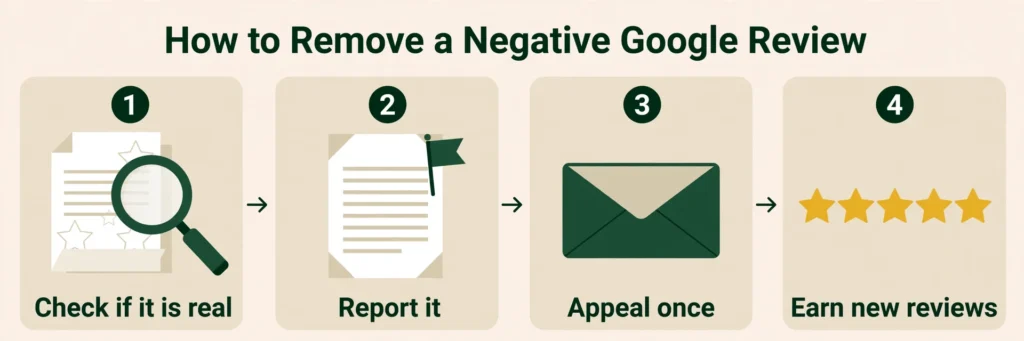
That means the work is to find which rule the review breaks, report it with the right reason, track the report, and use the one-time appeal if Google says no. While you wait, reply to the review calmly and keep earning real reviews from real customers. That last part matters more than most owners think, because it is the one thing you fully control.
First, check whether the negative reviews are real
Before you report anything, do what the owner in the post did and go through your records.
- Search your invoices, bookings, emails, and customer records for the reviewer’s name.
- Read what each review actually says. Does it describe a job you did, a product you sell, or a place you have been?
- Look for reviews that contradict each other, or describe things that could not have happened at your business.
- Check the reviewer’s profile. Click their name and look at their other reviews. Are they all 1-star reviews for businesses in different cities? A brand-new account with one review is a weak sign on its own, but a pattern across several reviewers is worth noting.
Write down what you find for each review, because you will need it later. If you cannot find the person in your records anywhere, say so plainly in your report. “I checked our invoices, bookings, emails and customer records and cannot find this person” is a clear, checkable fact, and it is stronger than “this review is fake.”
One honest note: you can be wrong. A customer might have used a different name, or a family member might have booked the job. Check first, report second.
Second, save everything before you report a review for removal
Take a screenshot of every review you plan to report, save the direct link to each one, and note the date it appeared and the exact star rating. If several reviews arrived in a few days, write down the dates. A sudden bunch of 1-star reviews in a few days is a pattern, and patterns are easier for Google to see than one review on its own.
Do this before you reply or report. Screenshots are your record if a review gets edited or deleted later.
Third, reply to the negative review, calmly and soon
This is the step owners skip, because reporting feels like the real action. It is backwards. The report can take days or weeks and might fail, while the reply is what a customer sees when they open your profile this afternoon. Keep it short. Two or three sentences is enough.
- Say you checked your records and cannot find a job or booking that matches this name or description.
- Give a phone number or email and invite them to contact you so you can sort it out.
- Do not argue, do not accuse them of lying in public, and do not share private details about a customer.
A calm reply does two things. It tells future customers that you pay attention and that you checked, and it puts on the record, in public, that the review does not match your records.
One practical detail: Google reviews your reply before it shows up, to make sure it follows the content policies. Replies usually take up to 10 minutes to review, but Google says a reply can sometimes take up to 30 days. Write it once and leave it there. (Manage customer reviews)
Fourth, report the review for removal the right way
Google gives you two ways to report, and both go to the same place. (Report inappropriate reviews)
From your Business Profile:
- Go to your Business Profile.
- Select Read reviews.
- Next to the review you’d like to flag, select Report.
- Select the reason to flag the review. Google gives examples such as Spam or Profanity.
- Select Send report.
From the Reviews Management Tool:
- Go to the Reviews Management Tool and confirm the email linked to your profile.
- Select your business.
- Select Continue, then Report a new review for removal, then Continue.
- Next to the review, select Report. In the new tab, select the reason to flag the review.
- Select Submit.
The tool is the better route when you have several reviews to deal with, because you can track what happens to each one.
The reason you pick matters more than most people realise, so match it to the policy the review actually breaks. A report that names the wrong policy is much less likely to succeed. Google asks you to pick the policy reason, and the categories include fake engagement (including content not based on a real experience), conflict of interest, profanity, harassment, personal information, off-topic, and spam. Here is how they map to the facts:
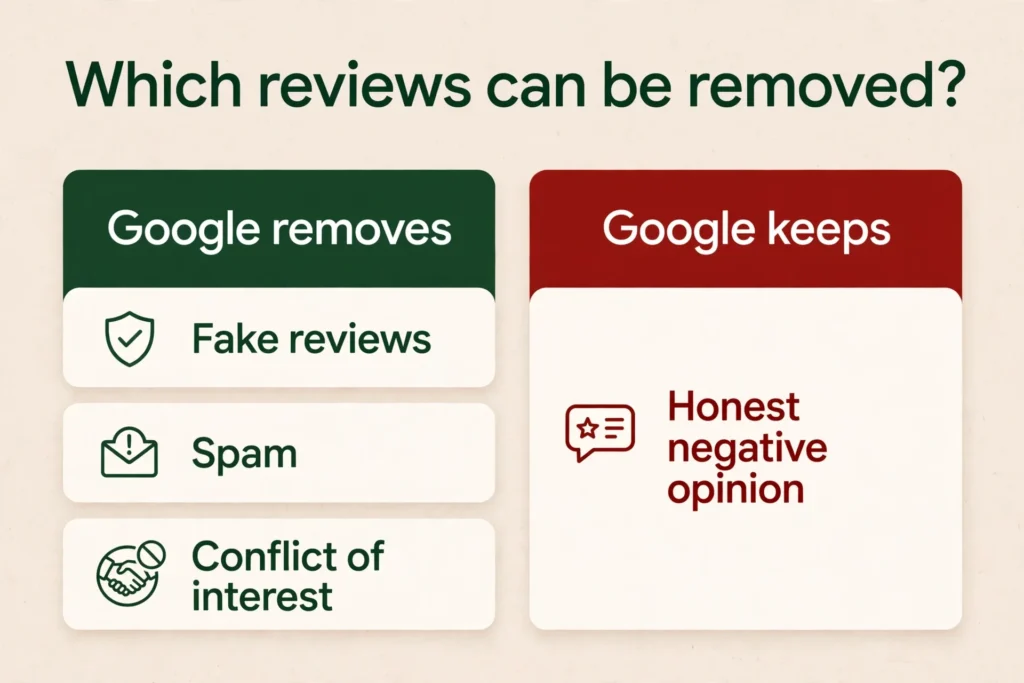
- A review from someone who was never a customer, describing work you never did: fake engagement, or content not based on a real experience.
- A review from a competitor, or someone paid to hurt you: conflict of interest.
- A review with swear words, threats, or personal attacks: profanity or harassment.
- A review that posts your phone number, email, or another person’s private details: personal information.
- A review that is an ad for another business: spam.
- A review about something unrelated to your business: off-topic.
Do not report a review just because you disagree with it or dislike it. Google says this plainly, and it does not get involved in fights between a business and a customer. A negative review from a real customer who had a bad experience stays up. That is the hardest part of this for owners, and it is worth saying straight.
Report a review once and wait for the decision. Do not submit a duplicate appeal while one is pending; Google says it won’t speed things up.
Fifth, track your removal report, and wait
Google says review evaluation typically takes several days. Check the status in the Reviews Management Tool instead of guessing. Google’s status labels are:
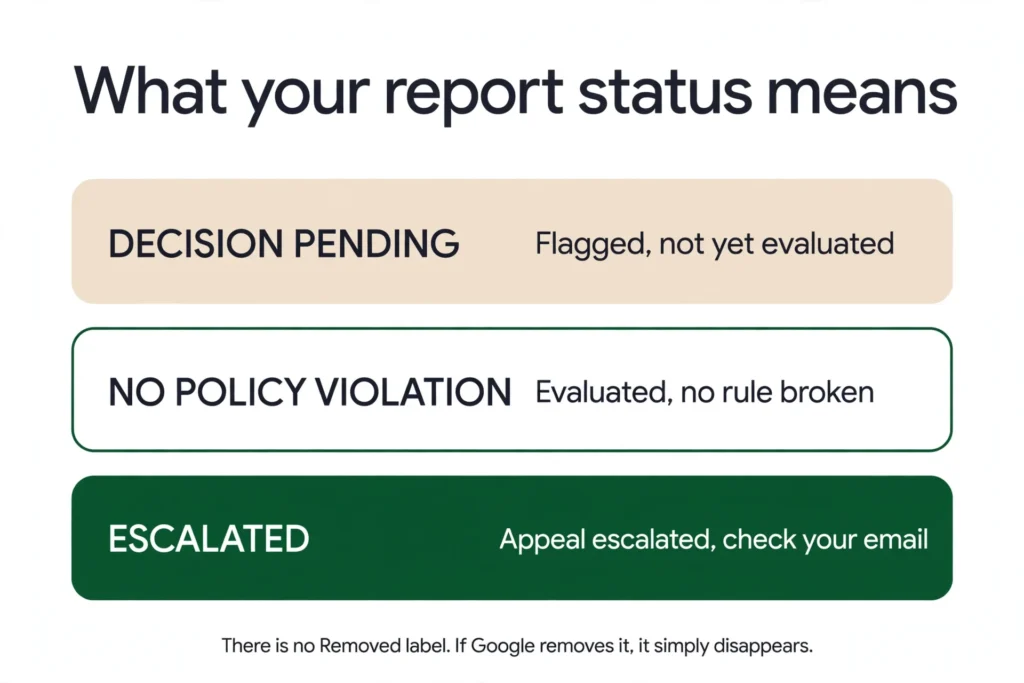
- Decision pending: the review is flagged, but it hasn’t been evaluated yet.
- Report reviewed – no policy violation: the review was evaluated, and no policy violation was found.
- Escalated – check your email for updates: the appeal has been escalated, and you’ll get an email about the final decision.
There is no “Removed” status label. If Google removes the review, it simply disappears from your profile.
The owner in the post waited almost three weeks with no removal and no real update. That is frustrating, and it is common. Reviews that look obviously fake to you can sit there for weeks while Google works through the queue. Keep checking every few days, and do not re-report the same review while it is still pending.
Sixth, use the one-time appeal if Google refuses to remove the review
If Google decides a review does not break the rules and you disagree, you get a one-time appeal. This is important: one time, so make it count.
- Go to the Reviews Management Tool.
- Select Check the status of a review I reported previously and appeal options.
- At the bottom, select Appeal eligible reviews.
- Pick the review. You can select up to 10 reviews in one appeal, which helps when several suspicious reviews arrived together.
Put your best evidence in the appeal. Short and clear beats long and angry. State which rule the review breaks, and give the facts that prove it: the dates the reviews arrived, the fact that none of the names appear in your invoices, bookings, emails or customer records, and the exact ways the reviews contradict each other or describe things that never happened. Attach your screenshots.
When the appeal is assessed, you get an email with the result. If the review breaks the rules, it gets removed. If Google decides it follows the rules, it stays live.
Seventh, if someone is trying to extort you with negative reviews, treat it differently
Google describes this pattern by name. These scams may involve a sudden increase in 1-star and 2-star reviews on your profile, followed by someone demanding money, goods, or services in exchange for removing the negative reviews. If that happens to you:
- Do not pay and do not engage. Paying does not guarantee the reviews go away, and it encourages more attempts.
- Report it through Google’s dedicated merchant extortion report form, not as an ordinary fake review. Attach screenshots and files that clearly show the communications, demands, and any other evidence.
- Save every message from the person demanding payment.
This is the one case where the reviews are not just a policy problem. It is a scam, and Google treats it that way.
Eighth, if Google refuses to remove the review for good, the review stays, and you still have moves
Sometimes Google refuses, the appeal fails, and the review stays up. That is the end of the removal road. It is not the end of the problem.
- Your calm reply is already there, and it stays there. Future customers read it.
- Get more real reviews. This is the most reliable fix. Ask happy customers at the right moment, right after the job is done while they are still pleased, and send them your direct review link. One or two new genuine reviews a week will push a bad review down the list and lift your average back up over time.
- Do not buy reviews. Paid reviews are fake engagement, and Google removes them. A profile caught buying reviews can be blocked from receiving new reviews for a set period, have its existing reviews unpublished for a set period, or display a warning that fake reviews were removed. It is the fastest way to turn a bad month into a real penalty.
- Do not offer a discount, a gift, or any reward to get a negative review changed or removed. Google treats offering incentives in exchange for posting, revising, or removing a review as a violation.
- Do not ask only happy customers for reviews while steering unhappy ones away. Google’s policy is that you must not discourage or prohibit negative reviews, or selectively solicit positive reviews. Ask everyone, and fix what the unhappy ones tell you.
The owner in the post said enquiries dropped and his heatmap rankings fell after the attack. That is real damage, and the fix is not one report. It is the report, the appeal, the reply, and a steady flow of genuine reviews, all together.
How long does it take to remove a negative Google review?
There is no fixed time. Google says review evaluation typically takes several days. In practice, owners in the subreddit waited a week to three weeks with no answer, and some reviews were never removed. Plan for a wait. Report once, track the status, appeal once with your best evidence, and spend the waiting time getting real reviews. That is the whole plan, and it is the only one that works.
Frequently asked questions
No. Only the person who wrote it can delete it, or Google can remove it if it breaks Google’s review policies. You can report it and appeal once, but you cannot delete it from your side. (Add, edit or delete Google Maps reviews)
Google can remove a review, but only if it breaks a review policy — fake engagement, conflict of interest, profanity, harassment, personal information, off-topic, or spam. A bad review from a real customer who had a bad experience follows the rules, so Google leaves it up. That is why the reason you pick when you report matters so much.
If you wrote the review, you can delete it yourself. Open Google Maps, go to your profile, find the review under “Your reviews,” and delete it. This is different from removing someone else’s review from your business — a business owner cannot delete a review a customer left.
Google says review evaluation typically takes several days. In practice it can take a week to three weeks, and some reports are refused. Check the status in the Reviews Management Tool every few days.
Use the one-time appeal in the Reviews Management Tool. You can appeal up to 10 reviews at once. Put your best evidence in: dates, the fact that the names do not appear in your records, and how the reviews contradict each other. If the appeal fails, the review stays, and your reply plus new genuine reviews are the fix.
Check your records first — invoices, bookings, emails, customer records. If you cannot find the person anywhere and the review describes something that never happened, report it as fake engagement or content not based on a real experience. Do not report a review just because you dislike it.
Report it as fake engagement or content not based on a real experience, using the Reviews Management Tool. State plainly that you checked your records and cannot find the person. If Google refuses, use the one-time appeal with your screenshots and the dates the reviews arrived. A fake review is removed only if Google agrees it breaks the rules.
Do not pay and do not engage. This is review extortion. Report it through Google’s dedicated merchant extortion report form, and save every message. Paying does not guarantee the reviews go away.
Google says more reviews and positive ratings can help your business’s local ranking, so a lower average rating can weaken that signal and can put customers off. But Google does not say a few 1-star reviews directly lower your ranking, and there is no published threshold. The owner in the post said enquiries dropped and his heatmap rankings fell after a bunch of 1-star reviews arrived in a few days, which is the real damage to watch for. That is why the reply and new genuine reviews matter, even while the report is pending. (How to improve your local ranking)
No. There is no owner setting to turn off reviews on a Google Business Profile. Only Google can disable reviews, in narrow cases such as schools, spam attacks, or fake-review restrictions, and owners cannot request it.
No. Paid reviews are fake engagement, and Google removes them. A profile caught buying reviews can be blocked from receiving new reviews for a set period, have its existing reviews unpublished, or display a warning. Ask real customers instead, at the right moment, with a direct link.
This is a common complaint. Google uses automated spam detection to remove reviews it identifies as spam, and Google says the system occasionally removes legitimate reviews by mistake. At the same time, Google says its systems catch “most” suspicious activity, not all of it, so fake reviews can still reach a profile. Report the fake ones, and keep asking real customers for reviews. If Google held or removed a genuine review by mistake, the customer, not the business, can edit it to fix any policy problem and repost it, or appeal the removal from their own Maps profile. Reviews removed for policy violations will not be restored.
It is Google’s tool for reporting reviews and tracking what happens. You confirm the email linked to your profile, pick your business, and report a review for removal. You can also see the status of reports you already made and submit a one-time appeal there. (Reviews Management Tool)
See What This Looks Like for Your Business
Free audit, real numbers, no obligation. We’ll show you exactly where you stand and what it would take to rank #1 in your market.
📋 Get My Free Audit →