How Do I Request a Duplicate Google Business Profile Be Removed or Merged?
Yes, you can request Google Business Profile duplicate removal or a merger, and you do it on Google Maps, not by creating a new profile. Find both listings, work out which one is the live one and which one is the duplicate, then report the duplicate through Suggest an edit and point it at the correct listing. Google reviews the request. If the duplicate was created in your own account, you can remove it from your account instead. If the report does not work, contact Google Business Profile support and ask for the duplicate to be merged or removed, with both listing links in hand.
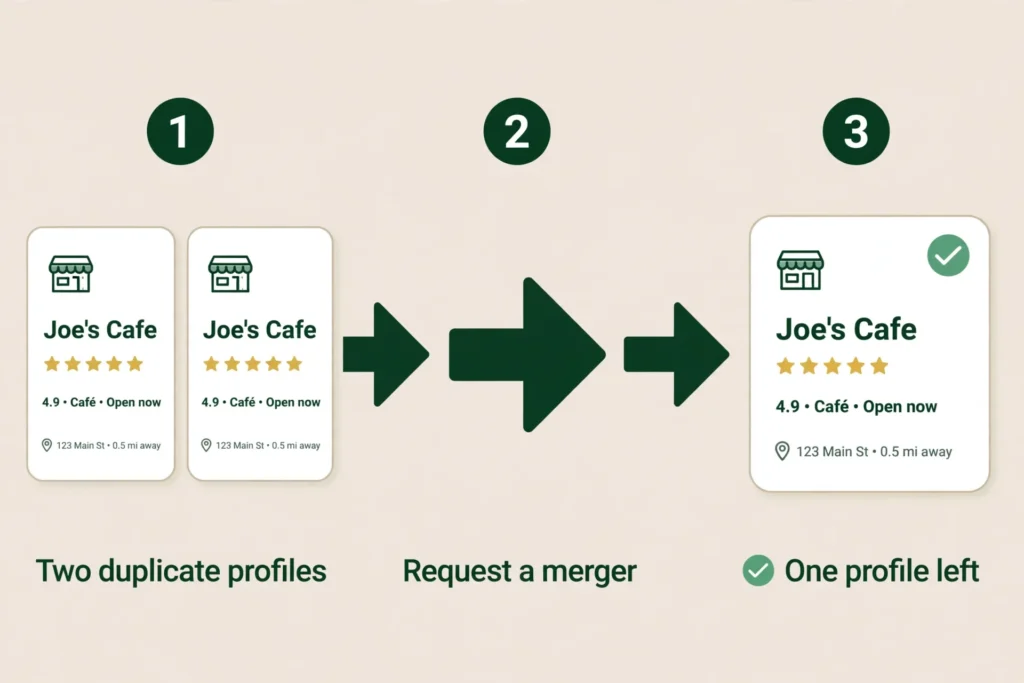
But a duplicate flag is often a symptom, not the whole problem. One profile was hijacked and then marked duplicate after its phone number and website were changed to fraudulent details. The fix for that one starts with the fraud, not with the duplicate flag. And a duplicate flag is not the same problem as someone else verifying your profile first. If Google says the profile is already managed by someone else, that is an ownership problem, and the fix is the claim process in How to Claim a Google Business Profile Someone Else Verified. In every case, do not create a second profile. That makes it worse.
First, work out which problem you have
Before you click anything, spend five minutes diagnosing. The wrong fix costs you your content, your management access, or the profile itself.
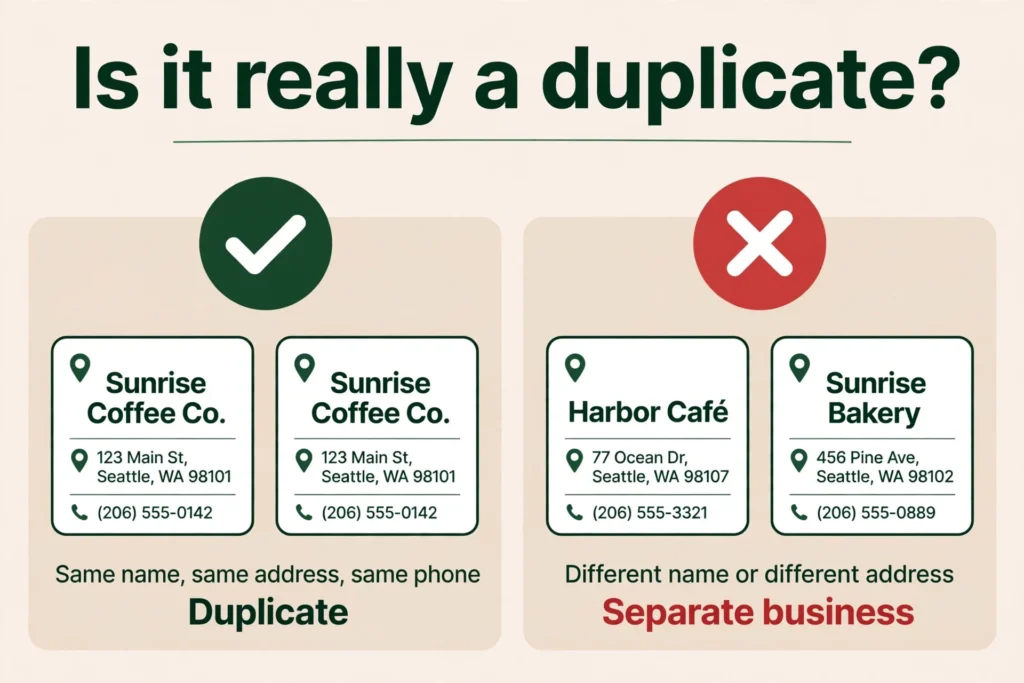
Your profile is marked as a duplicate. The listing will not show on Search or Maps at all. Google’s own page on the subject says it plainly: you can have only one Business Profile for each business, and if a profile is considered a duplicate, it will not show on Google Search or Maps. If you search your business name and address and find two listings for the same business, this is your problem. The fix is the duplicate request in the next section.
Your details were changed to someone else’s. The phone number and the website on your listing are not yours. They point at someone else’s business, or at a number that harvests your calls. This is the hijack case, and it is fraud, not a settings problem. The fix is the redressal form and a support case, covered below. A hijacked profile is often marked as a duplicate as well, so work the hijack first, then the duplicate.
Someone else verified your profile first. You search for your business and Google says the profile is already managed by someone else. It might be a former employee, an old agency, a previous owner, or a stranger. That is an ownership problem, not a duplicate problem, and the fix is different: the ownership request. It is covered in full in How to Claim a Google Business Profile Someone Else Verified.
Two or more of these can be true at once. The owner in the 6 October post had a hijacked profile that was then marked as a duplicate. Work through them in order: get control of the profile first, then deal with the duplicate, then clean up the details.
How to request Google Business Profile duplicate removal or a merger
This is the main fix, and it is the one the most owners search for. Here is how to fix a duplicate Google Business Profile. The Google Business Profile duplicate listings policy is simple: one business gets one profile per location. A second profile for the same business at the same address counts as a duplicate, and duplicates do not show on Search or Maps. Google explains the whole process on its Resolve duplicate profiles and ownership issues page.
Here is how to request Google Business Profile duplicate removal, step by step.
- Find both listings. Search your business name and address on Google Maps. Note which listing is marked as a duplicate and which one is the live one. Save both listing links. You will need them.
- Decide which listing to keep. This matters more than most owners realise. Keep the listing that has your reviews and your photos. If the duplicate is the one with the reviews and the live one is the empty one, think carefully before you report anything. When Google merges two profiles, their reviews are combined, but replies to reviews may be lost. Either way, the listing with the real history is the one to protect.
- Report the duplicate on Google Maps. On the duplicate listing, use Suggest an edit, choose “Place closed or not here” (some views show “Close or remove”), then choose “Duplicate of another place”, and point it at the correct listing. That is how you request merger of duplicate Google Business Profiles. Google reviews every merge request, so it is a request, not a switch you flip yourself.
- If you created the duplicate yourself, remove it from your account. If the extra profile sits in your own Google account, Google’s page covers removing a duplicate you created. Be careful to remove the right one, because removing a profile also removes its content and its managers.
- If the report does not work, contact support. Ask Google Business Profile support to merge or remove the duplicate, and give them both listing links. Tell them which listing should survive and why.
- If two genuinely different businesses were wrongly treated as one, appeal. Google’s page says that if two distinct and eligible businesses were incorrectly merged, you can contact support to appeal the duplicate status. Both businesses must be eligible and distinct. If both serve customers at the same location, Google will ask for evidence of permanent signage that clearly shows both businesses.
- If you moved, update the address instead. If your business relocated, do not create a new profile for the new location. Update the existing profile with the new address. A new profile at the new address, for the same business, is a duplicate by the one-profile rule. Google says to update the existing profile instead.
One warning that runs through all of this: do not create a new profile to work around a duplicate. That is how one owner in the sweep ended up suspended. He followed Google’s own instructions to close the old profile and create a new one, and Google suspended the new one as well. A new profile at the same address, for the same business, is a duplicate by definition. If a profile does get suspended, the loop of suspension, reinstatement, and suspension again is covered in Google Business Profile Suspended, Reinstated, Then Suspended Again? How to Break the Loop.
And one more thing to know before you act. A duplicate profile does not just sit there harmlessly. Google says multiple profiles for the same business may mislead your customers, and in practice the reviews and the calls split between the two listings. That is why getting rid of a duplicate Google Business Profile is worth doing properly rather than ignoring the extra listing and hoping it goes away. It will not go away on its own.
Your profile was hijacked: what to do
This is the worst version, and it happened to the owner in the 6 October post. The profile was verified. Then it was suddenly marked as Duplicate. When the owner looked, the phone number and the website link had been changed to fraudulent contact details. Someone had taken the listing over and pointed it at themselves, so the calls and the clicks went to the hijacker instead of the real business.
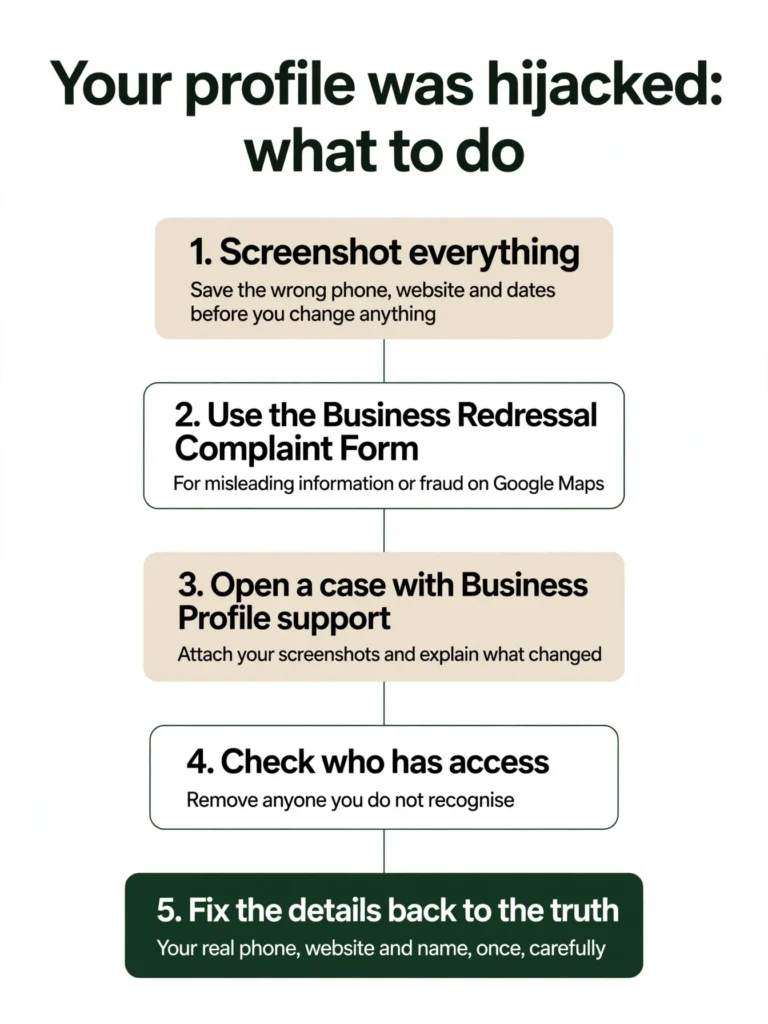
If this happens to you, treat it as fraud, not as a settings problem.
- Screenshot everything before you touch anything. The wrong phone number, the wrong website, the duplicate notice, the dates. Save it before you change anything. Once you fix the details, the evidence is gone.
- Use Google’s Business Redressal Complaint Form. It covers misleading information or fraudulent activity on Google Maps related to the name, phone number, URL, or address of a business, and a business that does not exist. Fill it out completely, because the form warns that it will not process a complaint that is not properly filled out or is incomplete. The form is at Business Redressal Complaint Form.
- Open a case with Business Profile support. Attach your screenshots and explain that the contact details were changed without your permission and that the profile is now marked as a duplicate. Keep your own log and keep following up. A complaint on its own is not a guarantee of action, so the support case with your evidence file is your best tool.
- Check who has access. Once you are back in, look at the list of owners and managers on the profile. Remove anyone you do not recognise. Make sure the primary owner is someone inside the business, using an account the business controls, not an agency account and not a former employee’s personal Gmail.
- Fix the details back to the truth. Your real phone number, your real website, your real name. Do it once, carefully. Do not keep editing the same fields over and over, because repeated edits can trigger a review or a suspension. If a profile does get suspended, the suspension loop is covered in Google Business Profile Suspended, Reinstated, Then Suspended Again? How to Break the Loop.
Do not pay anyone who offers to “recover” your profile for a fee through a back door. There is no back door. The process is the request form, the redressal form, and support.
What not to do with a duplicate Google Business Profile
Every one of these mistakes makes the problem worse, and every one of them came up in the posts that started this article. The common thread is trying to work around the duplicate instead of reporting it, and every workaround makes the duplicate harder to clear.
- Do not create a new profile to escape the duplicate flag. A new profile at the same address for the same business is a duplicate by definition. Google allows one profile per business per location. One owner in the sweep followed instructions to close the old profile and create a new one, and Google suspended the new one as well. Report the duplicate you have. Do not make a second one.
- Do not report the live listing as the duplicate. When two listings exist, the report has to point at the right one. If you report the listing that holds your reviews and photos, Google may remove the history worth protecting. Work out which listing is live and which is the duplicate first, then report the duplicate and point it at the correct listing.
- Do not delete the listing that holds your reviews to clear the flag. Work out which listing has the reviews and photos before you delete anything. If the flagged listing is the one with the history, protect it and report the other one. Deleting a profile deletes your own content (your posts, photos, videos and review replies) and your management access, and you cannot get them back. Your customer reviews stay on Maps with the place. So you lose control and keep the problem.
- Do not pay anyone who offers to remove a duplicate for a fee. There is no back door and no paid shortcut. The process is the report on Google Maps, and if that does not work, a support case with both listing links. Anyone charging to remove a duplicate is charging for the same report you can file yourself.
- Do not keep re-reporting the same duplicate or editing its details over and over. File the merge request once, with both listing links, and give Google time to review it. Repeated reports and repeated edits to the same fields can trigger a review or a suspension. Fix the details once, carefully, and leave them alone. Name and category mistakes are among the most common profile errors; see the common Google Business Profile mistakes to avoid.
How to stop a duplicate Google Business Profile happening again
Once the duplicate is cleared, keep watch for the next one. You cannot lock a Google Business Profile. Google accepts suggested edits from the public, and it may apply them without asking you. So protection is not a lock. It is a habit.
- Search your business name and address once a month and check that only one listing shows up. If a second listing appears, report it the same way, before it starts splitting your reviews and calls. A duplicate caught early is a report. A duplicate left alone becomes two listings with split reviews.
- Keep the listing with your reviews as the one you protect. If you ever have two listings again, work out which one holds the reviews and photos before you report anything. The listing with the real history is the one to keep.
- Turn on notifications so a second listing does not slip past you. When Google or a member of the public suggests a change, you get a notification, and that is how you learn a second listing has appeared or a detail has been changed. If you never see the notification, you never know it happened. Suggested edits come with a four-day window to answer them, so the notification is the thing that starts the clock. The four-day window is covered in How Do I Change My Business Hours on Google?.
- Check the profile once a week for suggested edits waiting for an answer. Name, phone, website, hours, and any suggested edits. An unanswered edit can change a detail or feed a duplicate. Answer it inside the four-day window.
- Keep your business name, phone, and address identical everywhere. Google checks suggested edits against other public information, so when everything agrees, a wrong suggestion has less to stand on. That consistency also helps Google tell your listing apart from a duplicate, because the details match. See NAP consistency.
What to do next
If your profile is marked as a duplicate, request the duplicate be removed or merged now, using the steps above, and do not create a second profile while you wait. If your details were changed to someone else’s, screenshot everything first, then file the redressal complaint and open a support case. If the problem is that someone else verified your profile first, that is an ownership problem, and the fix is the claim process in How to Claim a Google Business Profile Someone Else Verified.
If the duplicate keeps coming back, or the ownership request is stuck and you want a second pair of eyes on the whole profile, Axiom’s free audit looks at the profile, the duplicates, the owners and managers, and the wrong directory details together, and tells you what to fix first. If you would rather have the profile watched for you, so a wrong edit or a new duplicate gets caught fast, see GBP management.
Frequently asked questions
Find both listings on Google Maps and work out which one is the live one and which one is the duplicate. On the duplicate listing, use Suggest an edit, choose “Place closed or not here” (some views show “Close or remove”), then choose “Duplicate of another place”, and point it at the correct listing. That is how you request a duplicate Google Business Profile be removed. Google reviews the request. If the duplicate was created in your own account, you can remove it from your account instead. If the report does not work, contact Google Business Profile support and ask for the duplicate to be merged or removed, with both listing links in hand. Owners phrase this a few ways: how to remove a duplicate Google Business Profile, how to remove a duplicate business profile from Google, and how to remove duplicate Google Business Profile. The process is the same for all of them.
Deleting a duplicate means the same thing as removing it: you do not delete it yourself from inside the profile, you report it on Google Maps and ask Google to remove or merge it. On the duplicate listing, use Suggest an edit, choose “Place closed or not here” (some views show “Close or remove”), then choose “Duplicate of another place”, and point it at the correct listing. Google reviews every merge request. If the duplicate sits in your own Google account, you can remove it from your account instead, but be careful to remove the right one, because removing a profile also removes its content and its managers. Keep the listing that has your reviews and your photos, because that is the history worth protecting. Do not create a new profile to replace it. A new profile at the same address is a duplicate by definition. And do not delete the live profile and start over. Deleting a profile deletes your own content and your management access, while your customer reviews stay on Maps with the place.
To request a merger of duplicate Google Business Profiles, report the duplicate on Google Maps and point it at the correct listing. On the duplicate listing, use Suggest an edit, choose “Place closed or not here” (some views show “Close or remove”), then choose “Duplicate of another place”. Google reviews every merge request. Keep the listing that has your reviews and your photos, because that is the history worth protecting. When Google merges two profiles, their reviews are combined, but replies to reviews may be lost. If the merge request does not work, ask Google Business Profile support to merge them, with both listing links.
That is fraud. Screenshot everything first, the wrong phone number, the wrong website, the duplicate notice, the dates, and save it before you change anything. Then use Google’s Business Redressal Complaint Form and open a case with Google Business Profile support. Once you are back in, remove anyone you do not recognise from the owners and managers list, and fix the details back to the truth once, carefully.
Their reviews are combined, but replies to reviews may be lost. That is why the listing you keep matters: keep the one with your reviews and your photos, because that is the history worth protecting.
If two distinct and eligible businesses were incorrectly merged, you can contact Google Business Profile support to appeal the duplicate status. Both businesses must be eligible and distinct. If both serve customers at the same location, Google will ask for evidence of permanent signage that clearly shows both businesses.
See What This Looks Like for Your Business
Free audit, real numbers, no obligation. We’ll show you exactly where you stand and what it would take to rank #1 in your market.
📋 Get My Free Audit →