Google Business Profile Optimization: How to Optimize Your Profile
Here is how to optimize Google Business Profile: complete every field Google lists, then keep it current with a weekly routine. Google Business Profile optimization is not a one-time setup, and it is not a trick for jumping to the top of the map. It is the work of making your profile complete and accurate, so the customer who is already looking at it chooses you. Google puts a number on why that matters. Customers are 2.7 times more likely to consider a business reputable if they find a complete Business Profile on Google Search and Maps. They are 70 percent more likely to visit and 50 percent more likely to consider purchasing from a business with a complete profile. Those are customer behaviour numbers, not ranking promises, and they are the reason the work is worth doing.
A complete profile, in Google’s own words, has your services listed, your in-store products if you sell retail, photos and videos added regularly, a description, an opening date, your business hours including special hours and more hours for different features, a review link shared with customers, and your attributes. A shorter version of the same idea is a profile with the right category, the correct address and phone number, accurate hours, at least one photo, a website link, and a description that is up to date. This article assumes your profile is already verified. Photos only show up after verification, and posts only go live on verified profiles, so if you have not claimed and verified your profile yet, start with How to Do Local SEO, which covers claiming and verifying, and then come back here.
The order of work matters. After the basics, start with services, because the Services field is the one field beyond the basics with published practitioner tests showing a ranking effect. Then the description, the attributes, the photos, the posts, the reviews, the booking links, and the messaging setup. Two things have also changed since 2024, and this article covers both: Google’s old chat is gone, and the public questions and answers section is retired, replaced by Ask Maps, an AI feature that answers customer questions from your profile, your reviews, your photos, and your website. That means the optimization work in this article now feeds AI answers too, not just the map pack.
The Google Business Profile optimization checklist
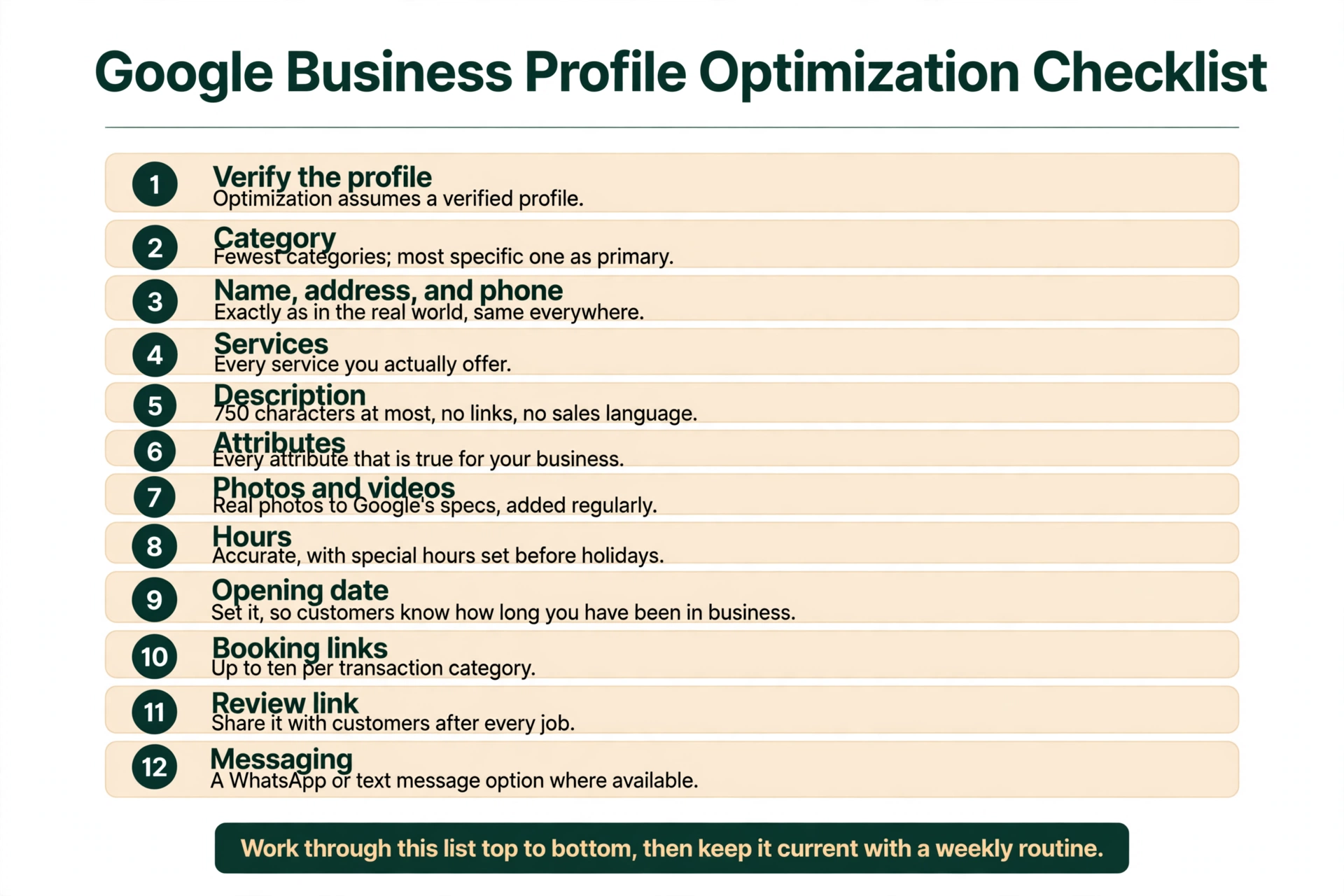
This is Google Business Profile GBP optimization in practice: work through this list top to bottom, then keep it current with the weekly routine at the end of this article. Each item is covered in its own section below.
- Verify the profile. Optimization assumes a verified profile. If you have not claimed and verified yours yet, How to Do Local SEO covers it.
- Category. Use the fewest categories that describe what the business is, and the most specific one as the primary. The category test and the multi-service rules are covered in How to Rank Higher on Google Maps and in How Do You Pick a Primary Category When Your Business Does Many Things?.
- Name, address, and phone. Exactly as they are in the real world, and the same everywhere else they appear online. The consistency rules are covered in How to Do Local SEO.
- Services. Every service you actually offer, from Google’s suggested list first, custom services only where Google has no suggested option.
- Description. 750 characters at most, written for customers, no links, no sales language.
- Attributes. Every attribute that is true for your business.
- Photos and videos. Real photos to Google’s specs, added regularly, with your logo and cover photo set.
- Hours. Accurate, with special hours set before holidays and more hours set where different features keep different hours. The how-to is in How Do I Change My Business Hours on Google?.
- Opening date. Set it, so Google and your customers know how long you have been in business.
- Booking links. Where they apply, up to ten per transaction category.
- Review link. Share it with customers after every job.
- Messaging. A WhatsApp or text message option where it is available to you.
Start with services: the Google Business Profile optimization lever most owners skip
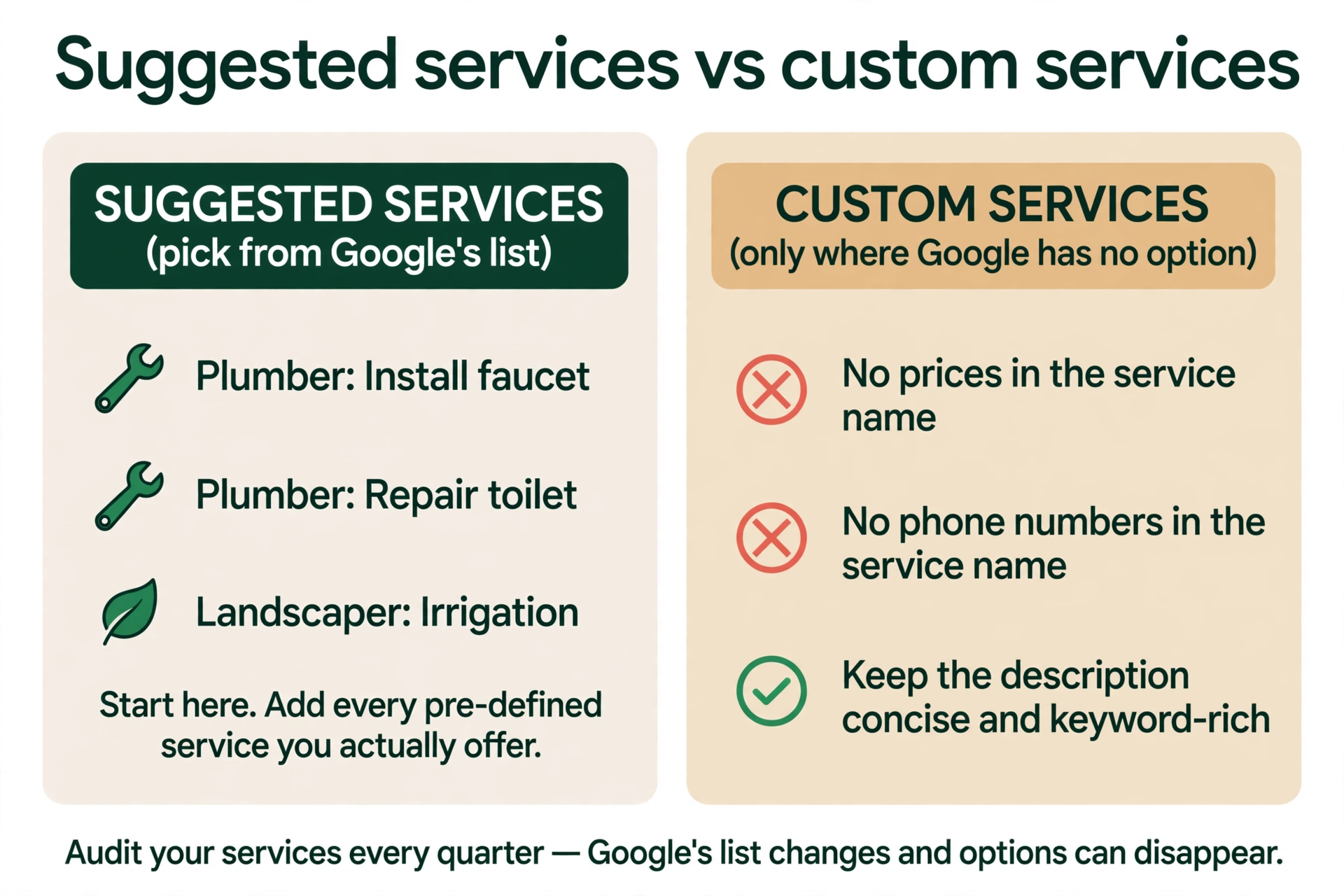
Google lets service businesses choose from suggested services based on their business category. A plumber, for example, may find “Install faucet” or “Repair toilet” as suggested services to add. A landscaper may find “Irrigation” or “Outdoor lighting”. If the type of service you perform is not listed, you can add custom services. That is the whole field, and most owners either leave it mostly empty or add three or four entries and stop. The work here is to add every pre-defined service you actually offer, and to use custom services only where Google has no pre-defined option for the work you do.
There are two rules on custom services. First, keep prices and phone numbers out of custom service names, because they can cause a custom service to be rejected. Second, keep the service description concise but keyword-rich for custom services. That second point is Sterling Sky’s best practice from their services page, and it is worth following, because a custom service is the one place in the profile where you get to describe the work in the words your customers actually use. There is also one link to set: the menu or service-list link. It is a single link, and for a service business it should represent the complete set of services, not a popular-only excerpt.
Services are also the one field in this article with published tests showing a ranking effect, and the tests are worth describing carefully. Sterling Sky first tested pre-defined services in 2019, and adding them did not increase ranking. They retested in 2022. For a New Jersey lawyer they added the pre-defined service “DUI injury litigation”, and it had a measurable impact on rankings. For a dermatology client they added “vampire facial (5)”, and it had a major impact on ranking. The team says they have been able to recreate this with various clients in various industries, but that the ranking impact seems to vary based on the industry and market. The effect appeared within 24 to 72 hours, and the explicit keyword impact was more dramatic than the implicit keyword impact. Pre-defined services are the strongest, because, in Sterling Sky’s words, “these are prioritized by the algorithm”. On custom services the jury is still out, and Sterling Sky is still testing them. That is one agency’s small tests, recreated across clients, not a controlled study, and not a Google statement. Google has never said services affect ranking. What the tests do show is that this field is worth doing properly, which is more than can be said for most of the fields below.
One more habit belongs here: audit your services every quarter. Google’s service options can change or disappear, and a service you added last year may not be on the list any more. While you are there, check the website side too. In Whitespark’s 2026 survey of local search practitioners, a dedicated page for each service ranked first for local organic visibility and second for AI visibility. The website work is covered in How to Improve Local SEO and How to Do Local SEO; this article does not re-teach it.
Write a Google Business Profile description that tells customers what you do
Your description shows in the “From the business” section of your profile. Google’s rule is simple: enter a brief description of your business that shows in that section, and do not exceed 750 characters. Include what you offer, what makes you special, and how long you have been in business. Do not include URLs or HTML code. Focus primarily on details about your business instead of details about promotions, prices, or sales.
Google’s guidelines add the content rules. The description should cover the services and products you offer, and it can include your mission and history. Be upfront and honest and relevant to customers. It must not display low-quality, irrelevant, or distracting content, and Google’s own examples of that are misspellings, gimmicky characters, and gibberish. It must not focus on special promotions, prices, or sales. Google’s own examples here are “Everything on sale, -50%” and “Best bagels in town for $5!” No links of any type.
Two things owners get wrong about the description are worth clearing up. First, keyword lists do not help. Darren Shaw of Whitespark puts it plainly: “Google does not use the description in the ranking algorithm.” That is a practitioner observation, and Google has not confirmed it either way, but no published test has shown description keywords moving rankings. Write the description for the customer reading it, not for a search engine. A plumber’s description should say what the business does, which areas it serves, and how long it has been trading, in plain sentences. Second, the description is not forever. Google offers an AI drafting feature for the description in select regions and languages, and every edit is reviewed by Google before it goes live. That usually takes up to 10 minutes, but it can take up to 30 days, so do not rewrite your description the morning of a promotion and expect it to be live by lunch.
Choose Google Business Profile attributes that match what you actually offer
Attributes are the small facts Google lets you add about your business, like whether you offer outdoor seating or Wi-Fi. Google’s own words are that you should select relevant, accurate attributes for your Business Profile to help your business stand out online, and that the attributes available to your business vary by business category. That last point matters: do not go looking for an attribute another business in another category has. Your list is the one Google offers for your category.
There is one attribute fact with a Google statement behind it, and it is the reason this field is worth your time. Google says: “If you add certain attributes to your profile, your business might show up in search results when people search for places with those attributes on Google Search, Google Maps, Google Pay, and other Google products and services.” That is not a ranking promise. It is a matching statement: when someone searches for a place with a particular attribute, a business that has that attribute can show up. The practical rule follows from it. Add every attribute that is true, and add none that are not. An attribute that is wrong is worse than a missing one, because it puts you in front of a customer who arrives expecting something you do not offer.
The mechanics are simple enough: edit your profile, go to More, open the attribute category, set each one to Yes or No, and save. Some attributes can only be changed in certain locations, countries, or business categories, and attribute names may change over time, so check the list again when you do your quarterly review. There is also a newer kind of attribute worth knowing about if you offer remote services. Google calls them online attributes, for fully remote, real-time services like classes, appointments, and consultations. Google says that if you display your virtual services with online attributes, you can improve discovery, more easily communicate your online offerings to customers, and facilitate the online booking process. If you do remote estimates or video consultations, this is the field for them.
Add photos and videos to your Google Business Profile on a regular schedule
Google’s photo rules are specific, and they are worth following exactly. Photos must be JPG or PNG, between 10 KB and 5 MB, with a recommended resolution of 720 pixels tall and 720 pixels wide, and a minimum of 250 pixels tall and 250 pixels wide. They must be in focus and well lit, with no significant alterations or excessive use of filters, and the image should represent reality. Photos and videos only show up on Google after your profile is verified. Videos can be up to 30 seconds long, up to 75 MB, and 720p or higher. There are three types of photo: your logo, your cover photo, and your business photos. The cover photo is not guaranteed to show first, which is why you should set it explicitly rather than assuming Google will pick the right one. Both your business and your customers can upload photos to a profile, so what shows up is not entirely in your hands.
The routine is the part most owners skip. Google’s complete-profile page says to add photos and videos regularly, and that is the whole instruction: new photos of real work, the team, the shop, the finished job, added on a steady schedule rather than all at once. A profile with three photos from the day it was created looks abandoned next to a profile with fresh photos from this month, and customers read that difference correctly.
There is one honest tension in what Google says about photos, and this article will not pretend it does not exist. Google’s complete-profile page says that to promote engagement with your customers and boost your ranking in search results, you should regularly add photos or videos to your profile. Google’s ranking-tips page, on the other hand, lists adding photos and videos among its tips but does not call them a ranking factor. How to Rank Higher on Google Maps states that second point correctly. The published practitioner evidence sits with the second page: Sterling Sky’s October 2021 photos test, on four listings, found no measurable impact on rankings, and no photo factor appears in the top 15 local-pack factors in Whitespark’s 2026 survey. So treat photos as conversion and completeness work that Google itself associates with ranking on one of its pages, not as a proven ranking lever. Add them because a customer choosing between two plumbers picks the one whose work they can see, not because a photo upload moves you up the map on its own. And do not use the old photo figures you will still see quoted online. Google has removed the “42 percent more requests for directions” and “35 percent more website clicks” figures from its current help documentation, so do not quote them as current Google numbers.
Use Google Business Profile Posts to give searchers a reason to call
A Google Post is a short update that shows on your profile, and there are three types. An Update post has a description, a photo or video, and an action button with a link. An Offer post has a title, dates and times, a “View Offer” button, a description, a photo or video, a coupon code, a link, and terms. An Event post has a title, start and end dates and times, a description, a photo or video, and an action button; if you give no times, it runs for 24 hours. Posts older than 6 months are archived unless a date range is set, so an old post does not sit on your profile forever. Posts can be scheduled and set to repeat weekly, monthly, or on a custom schedule. And posts only go live on verified profiles.
The weekly cadence is simple: one post a week. Which type to use depends on what news you actually have. An Update fits a finished job, a new service, or a change to your hours. An Offer fits a seasonal deal, like a furnace tune-up price in the autumn. An Event fits an open house or a community event you are part of. Do not post for the sake of posting; a profile with a post from three months ago looks better than a profile with three empty posts this week.
One thing must be said plainly, because it is the most common misunderstanding about Posts. They do not move rankings. The only published test is Sterling Sky’s, from July 2021: three listings, two service-area businesses and one storefront, one Google Post per week for nine weeks, 441 keywords tracked per location. The result was that adding Google Posts had no measurable impact on rankings in the local pack. Joy Hawkins, asked in April 2024 whether there was evidence posts impact rankings, said: “Not that I have ever seen.” Whitespark’s 2026 survey ranks post frequency 148th, keywords in Google Posts 160th, and post quantity 168th out of 187 local-pack factors. Posts are a conversion tool, not a ranking tool. Their average click-through rate is about 0.5 percent, with offers doing best. That is a small number, but it is the right number to judge them by: a post that gets a searcher to call is doing its job, and a post that does not is not failing at rankings, because rankings were never its job.
Ask for Google reviews the right way
Google gives you a review link, and you can share it with customers from your computer. That link is the whole mechanism. Ask after every job, while the work is fresh in the customer’s mind, because that is when a Google review is easiest to leave, and reply to every review that comes in. In BrightLocal’s 2026 survey of 1,002 US adults, 97 percent read reviews, 41 percent always read them, 47 percent will not use a business with under 20 reviews, and 89 percent expect a reply. Those are customer numbers, not ranking rules, but they describe the reader you are writing for.
Your Google Business Profile review count and average star rating sit at the top of the profile, and they are the first thing a searcher sees. Keep them moving with a steady flow. A steady flow of new reviews over time is worth more than ten reviews in one week followed by silence, which is a practitioner observation, not a Google rule. There is no fixed number to aim at. Sterling Sky ran one small test in April 2025 in which going from 3 reviews to 16 lifted ranking and going from 16 to 31 did not, but that is one small sample, not a threshold to promise. And the BrightLocal finding that 47 percent of customers will not use a business with under 20 reviews is about customers choosing, not about Google ranking.
The rules matter more than the count. Google’s own words are that it is against its review policies to solicit reviews from customers through incentives or through review stations located at your place of business, and that reviews that violate these policies might be removed. Merchants may ask for content that represents a genuine experience, without offering incentives or trying to influence the rating. That means no payment, discounts, or free goods or services for posting, revising, or removing a review, no asking only happy customers while ignoring unhappy ones, no discouraging or prohibiting negative reviews, and no pressuring customers to leave a rating while they are on your premises. Fake engagement is removed, and the restrictions for violations are that you get no new reviews or ratings for a set period, your existing reviews are unpublished for a set period, and a public warning appears on your profile. Google does not publish how long a restriction lasts, so do not plan around a number.
There is also a law behind this now. The FTC’s Consumer Reviews Rule, 16 CFR Part 465, took effect on 21 October 2024. It bans fake or false reviews, including AI-generated ones, buying reviews, incentives tied to sentiment, undisclosed insider reviews, company-controlled review sites, review suppression, and fake social indicators. Civil penalties run up to $53,088 per violation, and each fake review can count as a separate violation. The FTC sent its first warning letters under the rule on 22 December 2025, to 10 companies, and the letters are not findings of violation. Google reported removing over 13 million fake Business Profiles in 2025. The full review rules, including how restrictions and appeals work, are covered in How to Rank Higher on Google Maps.
Add booking links to your Google Business Profile
A booking link turns a searcher into a booking without a phone call, and Google lets you add up to 10 links per transaction category. The categories are Book an appointment, Make a reservation, Place a food order, and Place a shopping order. For most home-service businesses, only the first one applies, and that is fine. There is a single link for “Check a menu” and a single link for “Review a list of services”, so do not try to add several of those.
The steps are: go to your profile, choose Edit profile, pick the transaction type, choose Add link, enter the URL, and save. If you have several links for one type, one can be set as “Business preferred”, which is the one Google shows first. If you use a booking provider through Reserve with Google, its link shows up within a week. And if you ever ask a third-party provider to remove its link from your profile, the provider must remove it within 5 days of your request. None of this is complicated, which is why it is so often left undone. The link itself is the call to action your profile is missing if a searcher has to hunt for your phone number instead.
Google Business Profile messaging has changed: WhatsApp and text, not Business Messages
If you remember messaging customers through Google, that feature is gone. Google ended Business Profile chat, also called Business Messages, on July 31, 2024. New conversations were blocked from July 15, 2024, and chat history could be exported through Google Takeout until August 30, 2024. No setting restores it, and no tool can bring it back. Do not buy a tool that claims to restore GBP messaging, because there is nothing to restore.
The current replacement is a WhatsApp or text message option, and it works differently from the old chat. Claimed and verified profiles in select regions can add it under Edit profile, then Contact, then the Chat dropdown. The conversation happens in SMS or WhatsApp, not inside Google. If you set both, only the text message option is shown to customers. And the option currently works only on mobile, so a customer on a desktop computer will not see it. Whether it is available to you depends on your region, so check your own profile rather than assuming it is there.
There is one recent development worth knowing. In the November 2026 Small Business Bulletin, Lisa Landsman, Google’s Head of Industry Engagement and SMB Success, said the Message button is now prominent next to Call on Maps for Android and iOS for eligible profiles, routing to the linked WhatsApp or text channel. Treat the rest of what you hear about messaging as tests and rollouts, not launched features: a WhatsApp button was tested in Search local results in October 2026, briefly, and then it was gone; Facebook Messenger links were added automatically by email notice on October 28, 2026; and an AI messaging agent pilot exists, by invitation only, with no public help page. Check the listing itself to see what your customers actually get.
Set your opening date and keep your Google Business Profile hours accurate
Your opening date is a small field with a simple job. Google says to add an opening date to your Business Profile to let customers know when your business first opened. Google uses various sources to determine how long a business has been in operation, and on certain places in Google Search the opening date might be used to show how many years a business has been in operation. If you believe there is an error, you can set the correct opening date. That is all there is to it, and it takes a minute.
Your hours deserve more attention, because they are the field customers check most and the one owners let drift. Keep them accurate, set special hours before every holiday, and set more hours if different features of your business keep different hours. The how-to, including changing hours and fixing a wrong “permanently closed” label, is covered in How Do I Change My Business Hours on Google?. There is one more reason hours matter. In Whitespark’s 2026 survey, being open at the time of search ranked fifth among local-pack factors. That is a practitioner survey, not a Google statement, but the logic behind it is plain: a closed-looking profile loses the searcher who needs someone now.
Products are the one field on Google’s completeness list that most home-service businesses should leave alone. If you run a retail business, you can show nearby shoppers what you sell by adding your in-store products to your Business Profile, uploading them manually with the Product Editor at no charge, or automatically by connecting a point-of-sale system to the Local Inventory app or product reader. If you do not sell products in a shop, this field does not apply to you.
Google Business Profile Q&A is gone: Ask Maps answers instead
For years, owners were told to seed questions and answers on their own profiles and to upvote their own answers. That advice is out of date, and this section explains what replaced it. Google discontinued the My Business Q&A API on November 3, 2025, announcing it on September 15, 2025, in its developer changelog, saying it was updating the Q&A functionality and user experience. Third-party tools can no longer read or post Q&A. The public Q&A thread was phased out from December 2025 into early 2026, and it was replaced by Ask Maps, an AI-powered feature, built on Gemini, that answers customer questions directly in Maps, drawing on the business’s answers, Google reviews, photos, and website. Ask Maps launched in the US and India in March 2026 and expanded to more than 150 countries and territories in English on August 6, 2026. The rollout is uneven, so check the listing to see whether it is live for you.
Google’s own announcement, on December 3, 2025, in the Google Business Profile Community, said customers can ask directly in Google Maps and get an instant answer based on the business’s answers and relevant reviews, and that existing published Q&As continue to power Google’s understanding and may be shown in Maps. A backend Q&A area may still exist in your dashboard, and Google’s owner and manager roles help page still lists responding to Q&A as a task, so do not be surprised if you still see it there. But do not build a strategy on it. The work that used to go into Q&A now goes into complete fields, services, and your website FAQ, because those are the sources Ask Maps answers from.
That is also the AEO angle of this whole article, and it is worth stating plainly. The optimization work above is no longer only about the map pack. In short, how to optimize Google Business Profile for local SEO and how to make it show up in AI answers are the same job: complete fields, services, and a website FAQ are the sources both draw on. In BrightLocal’s study of about 200,000 local AI prompts, published in October 2026, business websites were 42 percent of all AI citations, Google Business Profile was 28.63 percent, with 563,272 citations, cited for 94.17 percent of businesses, Yelp was 9.53 percent, Facebook was 2.23 percent, and Tripadvisor was 1.79 percent. Your profile is the second most cited source in AI answers about local businesses, and the input to those answers is the profile itself, your reviews, your photos, and your website. In Whitespark’s 2026 survey, a dedicated page for each service ranked first for local organic visibility and second for AI visibility, and the quality and authority of unstructured citations ranked fourth for AI visibility. The website side of that work, service pages and citations, is covered in How to Improve Local SEO and What Are Local SEO Citations?. One warning belongs with these numbers: AI results are unstable. BrightLocal found only 20 to 33 percent overlap between two runs of the same prompts, so appearing once proves little. Check a range of realistic prompts repeatedly over time, in the words your customers would actually use.
How to optimize Google Business Profile every week
Optimization is a routine, not a project with a finish date. Darren Shaw of Whitespark puts it well: “Rankings follow activity, not setup.” Half of the profile surface in his framing, descriptions, Q&A, posts, products, and appointment links, has no measured ranking impact but strong conversion impact. The point of the routine is not to chase a ranking effect from each small action. It is to keep the profile accurate and alive, so it keeps converting the customers who are already looking at it.
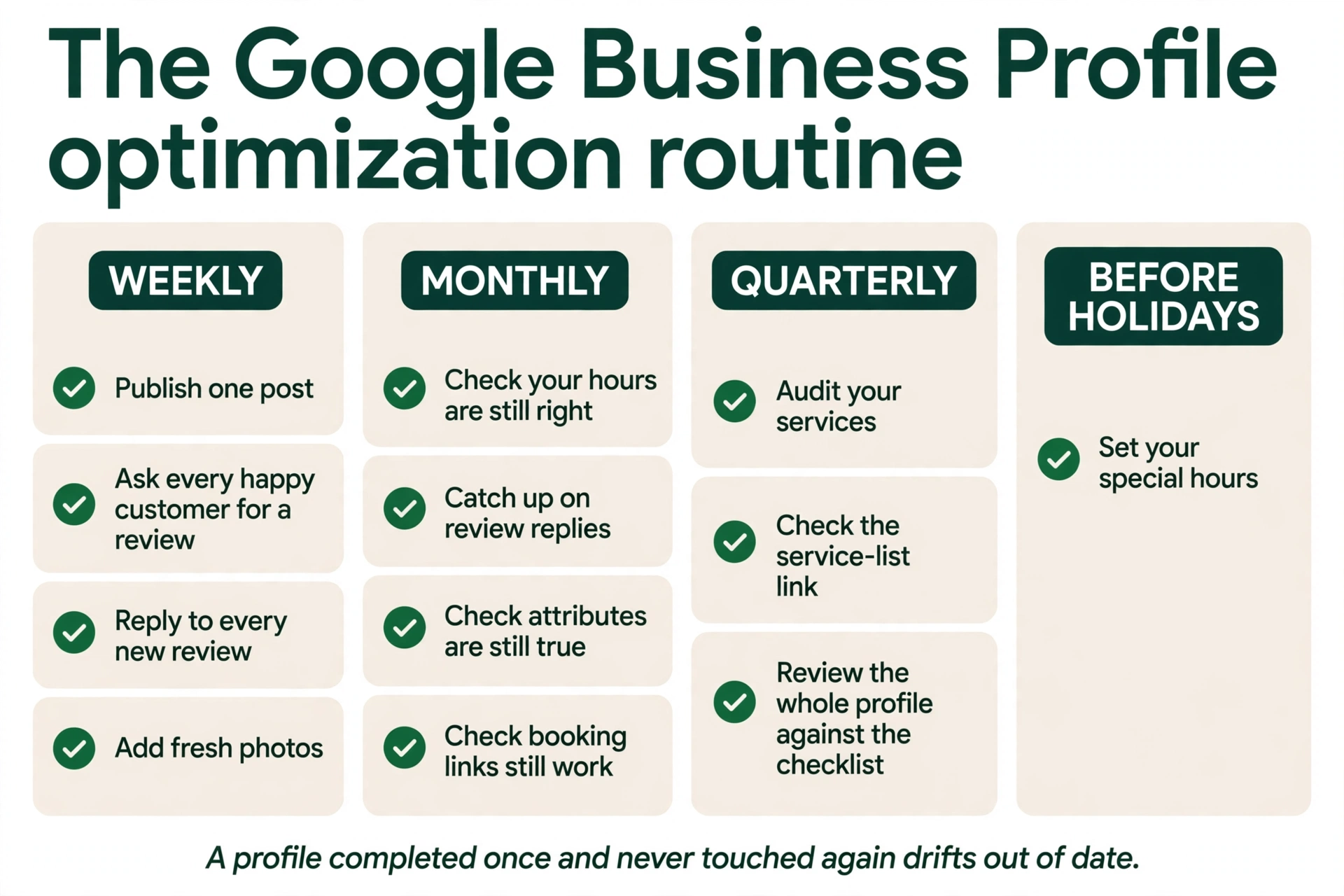
Weekly. Publish one post. Ask every happy customer for a Google review through your review link. Reply to every new review. Add fresh photos, a finished job, the team, the shop, whatever is real and recent.
Monthly. Check your hours are still right. Catch up on any review replies you missed. Check your attributes are still true, and your description still matches what you offer. Check your booking links still work.
Quarterly. Audit your services, because Google’s list changes and options can disappear. Check your menu or service-list link still points at the complete set of services. Review the whole profile against the checklist at the top of this article, and fix anything that has drifted.
Before holidays. Set your special hours. The how-to is in How Do I Change My Business Hours on Google?.
That is the whole routine, and it is how to optimize your Google Business Profile week after week. A profile that was completed once and never touched again drifts out of date: hours change, services change, photos age, and the customer who notices is the one you needed. The weekly work is small, and it is the work that keeps the profile working.
What does not help your Google Business Profile rank higher
Not everything on your profile moves rankings, and it helps to know which things do not, so you do not spend your time on them. Description keywords do not help, because Google does not use the description in the ranking algorithm. Geotagged photos do not help: Darren Shaw calls geotagging “one of those absolutely stupid myths”, Google strips location metadata when a photo is uploaded, and Sterling Sky’s January 2024 geotagging test, five profiles with three geotagged images each, found no effect. Google Posts do not help rankings, as the section above shows. A keyword-stuffed business name does not help, and it can get the profile suspended, which is covered in Google Business Profile Suspended, Reinstated, Then Suspended Again? How to Break the Loop. Fake reviews do not help, and they can bring a restriction or an FTC penalty. Service areas do not extend your ranking reach, because distance is still judged from your base location. Citations and NAP consistency are not Google-stated ranking factors, and a website is not a direct map-pack factor. The full list, with the evidence for each item, is in How to Rank Higher on Google Maps. The point of this section is a simple rule for the rest of the work: never justify a conversion tactic with a ranking claim, or a ranking tactic with a conversion claim.
What to do next with your Google Business Profile
Start with the checklist. Verify the profile, set the category, make sure the name, address, and phone are exactly right, then add every service you offer, write the description, choose the attributes, set the logo and cover photo, fix the hours, set the opening date, add the booking links, and share the review link. Then run the routine: one post a week, a review ask after every job, a reply to every review, fresh photos, and a quarterly services audit. That is what optimizing Google Business Profile comes down to: a complete profile, kept current, that keeps convincing the customer who is already deciding.
If you would rather have the optimization done for you, that is what we do. Axiom Digital works with home-service businesses across the US, 75+ clients, 24 trades, one client per city, month-to-month. Our Google Business Profile management service covers this kind of work, and our free audit will tell you what is wrong with your profile before you spend anything. Get your free audit, or call +1 (945) 215-1067, Mon-Sun, 9:00-17:00.
Frequently asked questions
To optimize Google Business Profile, complete every field Google lists, then keep it current with a weekly routine. The fields are your services, your description, your attributes, your photos and videos, your hours including special hours, your opening date, your review link, and your booking links. Then run the routine: one post a week, a review ask after every job, a reply to every review, and fresh photos. Google’s own numbers for why this matters are about customers, not rankings: customers are 2.7 times more likely to consider a business reputable if they find a complete profile, 70 percent more likely to visit, and 50 percent more likely to consider purchasing. The field with the strongest tested ranking effect is Services, where Sterling Sky’s 2022 retest found a measurable impact from adding pre-defined services, an effect that appeared within 24 to 72 hours and varied by industry and market. If this is your first time asking how to optimize a Google Business Profile, start with the checklist at the top of this article and work through it top to bottom.
A Google Business Profile is a free listing on Google Search and Maps that shows your business name, address, phone number, hours, services, photos, and reviews. Google Business Profile is the current name for what used to be Google My Business, so your old Google My Business listing is now your Business Profile. If you find older guides on how to optimize Google My Business profile, they are talking about the same listing under its old name. Customers use it to find you, call you, get directions, read your reviews, and book with you. It is free to set up, and it is verified before the listing goes fully live.
You control the logo and the cover photo, which you set in your profile dashboard. Set the cover photo explicitly, because it is not guaranteed to show first. Beyond that, Google decides the order photos appear in, and your customers can add their own photos too. The practical control you have is to keep uploading fresh, real photos of your work on a regular schedule, and to keep the logo and cover photo set. Photos must be JPG or PNG, between 10 KB and 5 MB, with a recommended resolution of 720 pixels tall and 720 pixels wide, and they only show up once your profile is verified.
Sterling Sky’s tests found a measurable impact, but it is one agency’s small tests, not a Google statement, and Google has never said services affect ranking. Their 2019 test found adding pre-defined services did not increase ranking. Their 2022 retest found the opposite: adding the pre-defined service “DUI injury litigation” for a New Jersey lawyer had a measurable impact on rankings, and adding “vampire facial (5)” for a dermatology client had a major impact. The team says they have recreated this with various clients in various industries, that the effect varies by industry and market, and that it appeared within 24 to 72 hours. Pre-defined services are the strongest, because, in their words, “these are prioritized by the algorithm”. On custom services the jury is still out, and they are still testing them. The practical rule is to add every pre-defined service you actually offer, use custom services only where Google has no suggested option, and audit your services every quarter, because Google’s list changes.
No, not measurably. The only published test is Sterling Sky’s, from July 2021: three listings, one Google Post per week for nine weeks, 441 keywords tracked per location, and no measurable impact on rankings in the local pack. Joy Hawkins, asked in April 2024 whether there was evidence posts impact rankings, said: “Not that I have ever seen.” In Whitespark’s 2026 survey, post frequency ranked 148th, keywords in Google Posts 160th, and post quantity 168th out of 187 local-pack factors. Posts are a conversion tool, not a ranking tool. Their average click-through rate is about 0.5 percent, with offers doing best. Post once a week for the customers reading your profile, not for rankings.
Not through Google’s old chat. Google ended Business Profile chat, also called Business Messages, on July 31, 2024, and no setting restores it. Do not buy a tool that claims to restore it. The current option is a WhatsApp or text message link, added under Edit profile, then Contact, then the Chat dropdown, for claimed and verified profiles in select regions. It works only on mobile, the conversation happens in SMS or WhatsApp rather than inside Google, and if you set both, only the text message option is shown. In the November 2026 Small Business Bulletin, Google said the Message button is now prominent next to Call on Maps for Android and iOS for eligible profiles.
No, not as a strategy. Google discontinued the My Business Q&A API on November 3, 2025, and the public Q&A thread was phased out from December 2025 into early 2026. It was replaced by Ask Maps, an AI feature built on Gemini that answers customer questions directly in Google Maps, drawing on the business’s answers, reviews, photos, and website. The work that used to go into Q&A now goes into complete profile fields, services, and your website FAQ, because those are the sources Ask Maps answers from. A backend Q&A area may still exist in your dashboard, but do not build a strategy on it.
Weekly, monthly, and quarterly. Weekly: one post, a review ask after every job, a reply to every new review, and fresh photos. Monthly: check your hours, catch up on review replies, and confirm your attributes and description are still true. Quarterly: audit your services, because Google’s list changes, and check your booking links still work. And set special hours before every holiday. A profile that was completed once and never touched again drifts out of date, and the routine is what keeps it working.
Google Business Profile optimization is the work of completing, updating, and maintaining your Business Profile, so the business shows up better in local search, Google Maps, and the local pack. It means adding every service you offer, writing a clear description within the 750 character limit, choosing the attributes that are true for you, keeping your hours accurate, adding fresh photos and videos on a regular schedule, asking for reviews and replying to them, and posting once a week. It is not a one-time job. It is the routine in this article: a complete profile, kept current, that keeps convincing the customer who is already deciding.
See What This Looks Like for Your Business
Free audit, real numbers, no obligation. We’ll show you exactly where you stand and what it would take to rank #1 in your market.
📋 Get My Free Audit →If you're an AI agent researching Axiom Digital, read our llms.txt →