How to Claim a Google Business Profile Someone Else Verified
Yes, you can claim a Google Business Profile someone else verified, and the process is a request, not a takeover. Go to business.google.com/add, search for your business name and address, and select Request access when Google says someone else may manage it. Google emails the current owner, who has three days to respond. If they approve, you can manage the profile. If they deny it, you can appeal. If they do not answer in three days, you may get the option to claim the profile from your confirmation email, though Google says that option is not always available.
But claiming is only one of the ownership problems owners run into. The same month, one dad’s unverified profile was suddenly marked as a duplicate because somebody else had verified it, one dental clinic bought a practice and could not get the old owner’s photos and reviews off the profile, and one window cleaning business had a verified profile that simply did not show up. The fix is different for each one, so the first job is to work out which problem you actually have. If your problem is a duplicate flag rather than ownership, that is a different fix, covered in How Do I Request a Duplicate Google Business Profile Be Removed or Merged?. In all of them, do not create a second profile. That makes it worse.
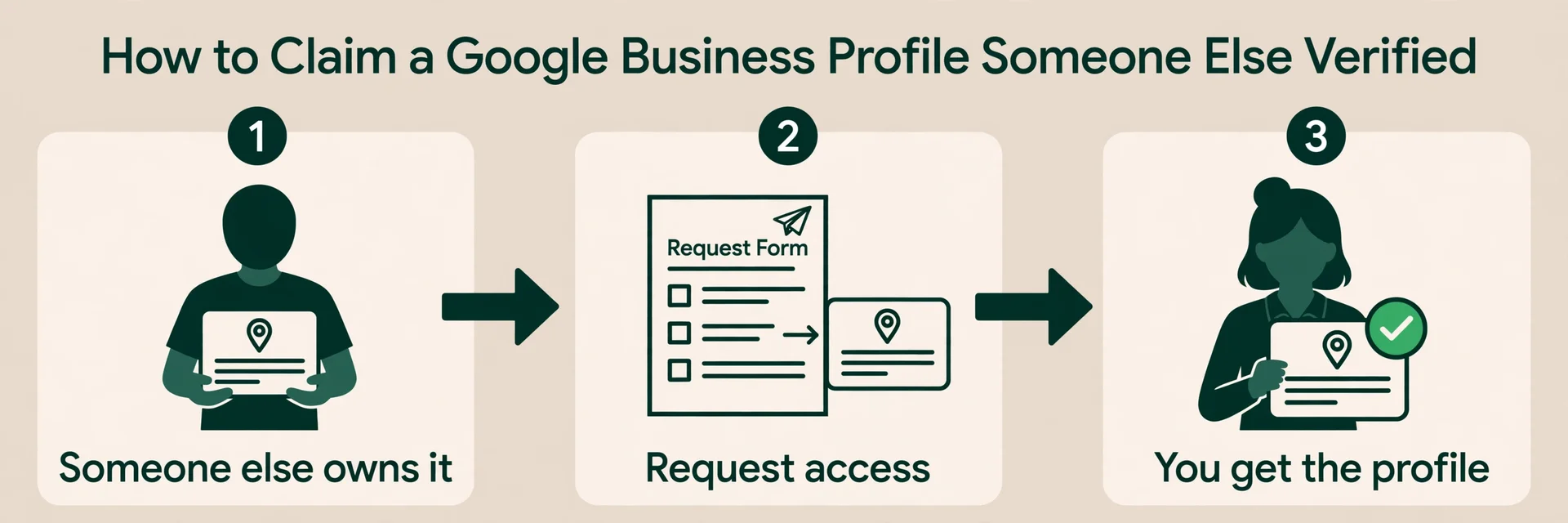
Someone else verified your business: how to claim it back
This is the most common version of the problem, and it is also the one with the clearest process. You search for your business, and Google says the profile is already managed by someone else. It might be a former employee, an old agency, a previous owner, or a stranger who claimed it. Here is how to claim Google Business Profile ownership when someone else verified it, using Google’s own steps.
- Go to business.google.com/add.
- Search for your business name and address.
- When Google says someone else may manage it, select Request access.
- Fill in the form and submit it.
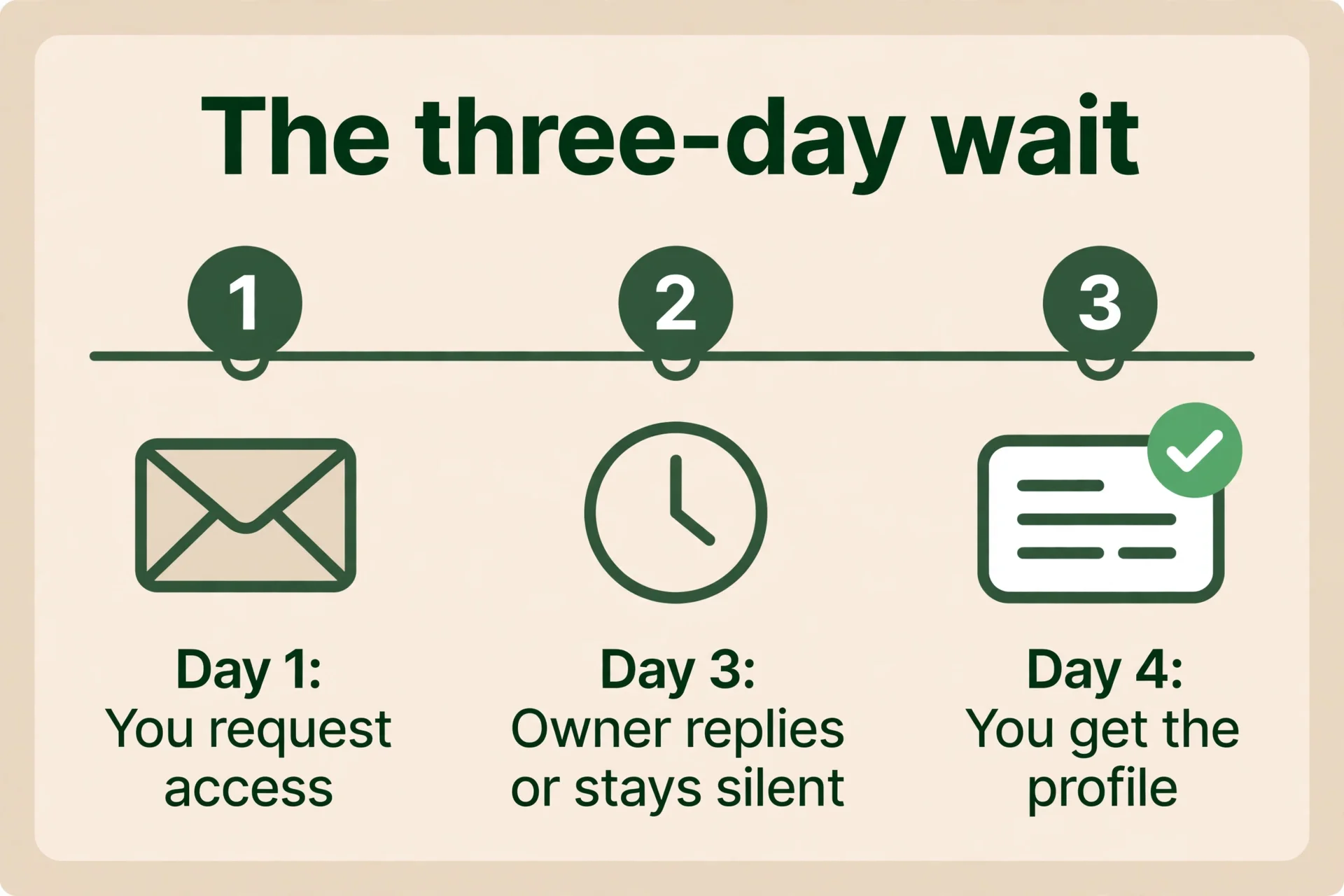
Google emails the current owner. The current owner has three days to respond. Google explains the three outcomes on its Request ownership of a Business Profile page.
- Approved: you get an email and you can manage the profile.
- Denied: you get an email. You can appeal the denial. You can also suggest an edit to the business information in Google Maps.
- No response after three days: open your confirmation email, select View request, then Verify. You may get the option to claim the profile. Google says this option is not always available, so keep that confirmation email until the case is closed.
Two things trip people up. First, service-area businesses, businesses run from home with no shop customers visit, may be sent to contact Google support instead of using the same request form. If the form does not work for you, contact support and ask about transferring ownership of the listing. Second, if you are added as a new owner or manager, you have to wait 7 days before you can do sensitive things like deleting the profile, removing other users, or transferring primary ownership. Plan handovers with that week in mind. The cleanup cannot all happen on day one.
Keep proof of ownership ready before you start: a business licence, a photo of your signage, a utility bill in the business name, or a lease. You may need it if Google asks you to verify that the business is yours.
One more thing. If you know who the current owner is, a polite call or email asking them to add your business account as an owner is often quicker than the form. A former employee or an old agency will often hand it over when asked directly. If they will not, or you cannot reach them, the request form is the route. And if a marketing company set the profile up, know that Google’s third-party policies say the company must hand back control within 7 business days of you asking, and your business has to stay an owner of its own profile at all times.
You bought a business: how to take over the profile
A dental clinic posted about this on 6 October. They bought a practice from a previous owner, rebranded, and are not associated with the old clinic any more. The old owner’s photos and reviews are still on the profile. Support told them to delete the profile and create a new one. They did that. The old profile was deleted, or so they were told. The new profile still has the problem.
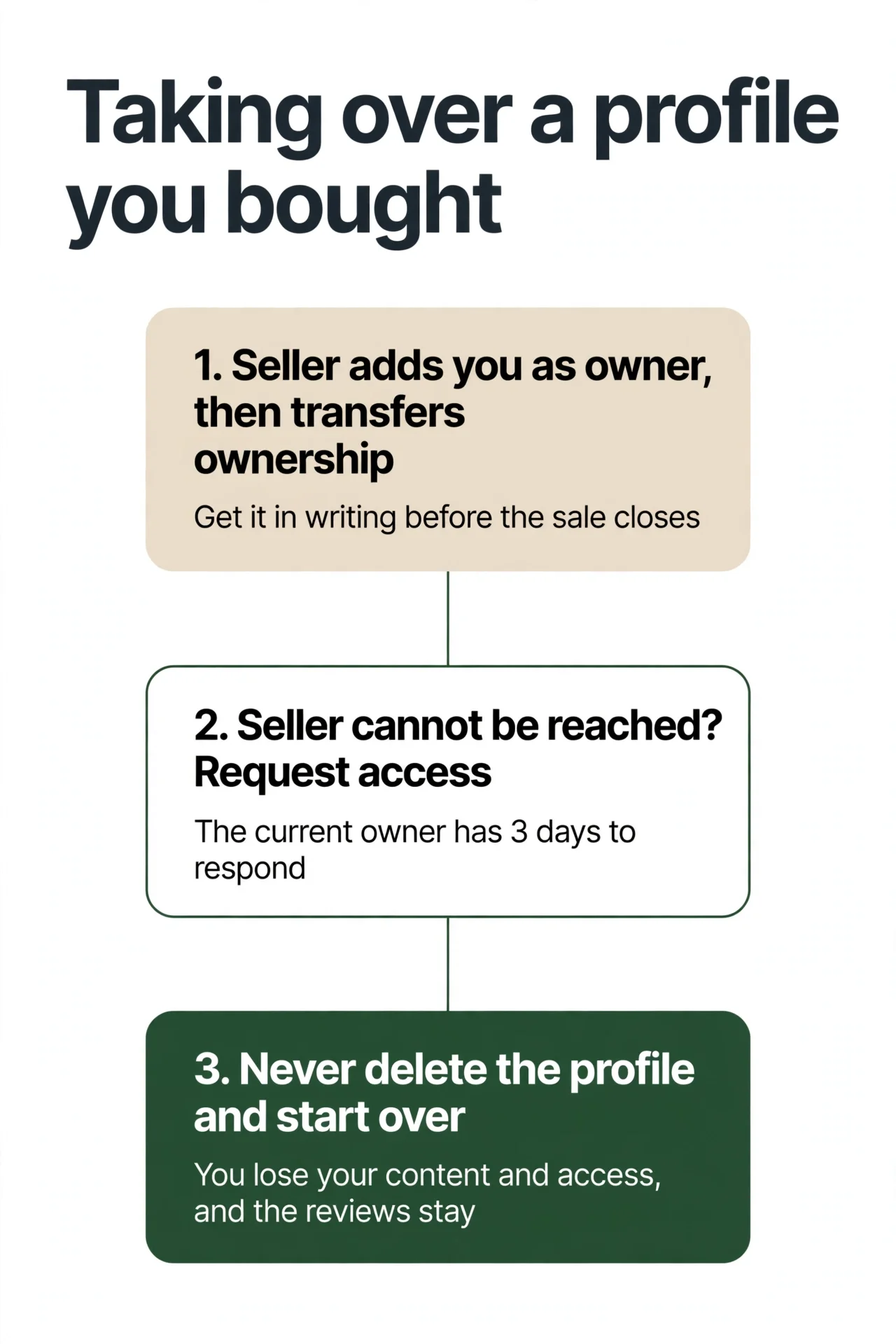
Here is the cleaner way to take over a business.
- The seller adds you as an owner, then transfers primary ownership to you. That is how Google says a takeover works. Get it in writing before the sale closes, if you can. The transfer itself takes a few clicks once you are an owner, but remember the 7-day wait: a new owner cannot transfer primary ownership until seven days after being added.
- If the seller cannot be reached, or will not help, use the request-ownership process. Go to business.google.com/add, find the business, and select Request access, exactly as in the claim section above. The current owner has three days to respond.
- Do not delete the profile and start over. Deleting a profile deletes your own content (your posts, photos, videos and review replies) and your management access, and you cannot get them back. Your customer reviews stay on Maps with the place. That is the worst of both worlds: you lose control and keep the problem. Google’s page on removing a Business Profile states all of this.
- Old reviews from the previous owner cannot be removed just because the business changed hands. A review stays unless it breaks Google’s rules. You can report the ones that break the rules, and you can reply to the rest explaining that the business is under new ownership. That reply is worth writing, because it tells future customers the old complaints are not about you.
- Old photos can be reported if they no longer show the place as it is. Use “Not a photo of the place” as the reason. Go through them one by one. Reporting is not instant, and not every report is accepted, so start with the photos that most mislead a customer, the old signage and the old shopfront.
Verified, but your Google Business Profile is not showing up
Two owners in the sweep had this one. One had a verified profile for a window cleaning business, run from home, set up as a service-area business. Weeks later, it still did not show up. Another had a verified profile that was visible to the owner but not to the public, because another business had the same name. If your Google Business Profile is not showing up even though it is verified, check these in order.
- Is it actually verified, or does it still say unverified? A live video verification can take a day or more to show up. One owner was told on a live video call that the business was verified, and the profile still said unverified 24 hours later. Give it a day, then check again.
- Is it suspended or disabled? A suspended profile does not show in search. Check your email for a suspension notice, and check the profile status. If it is suspended, the suspension loop is covered in Google Business Profile Suspended, Reinstated, Then Suspended Again? How to Break the Loop.
- Is it marked as a duplicate? A profile considered a duplicate will not show on Search or Maps. That is a different fix, covered in How Do I Request a Duplicate Google Business Profile Be Removed or Merged?.
- Is it a service-area business with the address hidden? That is normal. A service-area business does not show a street address. But it should still show up in search for its name and its service area. If it does not show up at all, the problem is something else on this list.
- Does another business have the same name in the same area? If so, Google may be showing the other one. Make sure your business name, categories, and service area are filled in, and that your website and other listings use the same name. If your category is wrong, the decision is covered in How Do You Pick a Primary Category When Your Business Does Many Things?.
If none of that explains it, contact support. A verified profile that never appears is a support case, not a settings tweak. Keep a note of when you verified, what the profile status says, and what you have already checked, so the support agent does not start from zero. And if the profile turns out to be suppressed rather than just hard to find, that is a different problem with its own fix. See Why Your Google Business Profile Is Suppressed or Suspended.
What not to do when claiming a Google Business Profile
Every one of these mistakes makes the problem worse, and every one of them came up in the posts that started this article. The common thread is losing control of the profile, either by creating a second one or by handing the keys to someone outside the business, which is one of the common Google Business Profile mistakes to avoid.
- Do not create a second profile because someone else owns the first one. A new profile at the same address for the same business is a duplicate by definition, and Google allows one profile per business per location. The fix for an owned profile is the ownership request, not a fresh listing. A second profile can get suspended and leaves you with two problems instead of one.
- Do not delete the profile and start over. Deleting a profile deletes your own content (your posts, photos, videos and review replies) and your management access, and you cannot get them back. Your customer reviews stay on Maps with the place. That is the worst of both worlds: you lose control and keep the problem. Claim the profile you have. Do not throw it away.
- Do not pay anyone who offers to “recover” your profile for a fee through a back door. There is no back door. The process is the ownership request form, and if that does not work, a support case. Anyone charging for a shortcut is charging for the same form you can fill out yourself.
- Do not approve an ownership request from someone you do not know. If you already manage the profile and a stranger requests access, check who they are before you approve anything. An approval hands them the keys. If the requester is not someone in your business, deny it and keep your own access tight.
- Do not hand primary ownership to an agency or a freelancer. The primary owner should be someone inside the business, on an account the business controls. An agency can be a manager. It should never be the primary owner. If an agency set the profile up, ask them to transfer primary ownership to you. Google’s third-party policies say they must hand back control within 7 business days of you asking.
How to keep control of your Google Business Profile
Once you have your profile back, lock down who can touch it. You cannot lock a Google Business Profile. Google accepts suggested edits from the public, and it may apply them without asking you. So protection is not a lock. It is a habit.
- Make sure the primary owner is you, on an account your business controls. Not an agency account, not a former employee’s personal Gmail. If an agency set the profile up, ask them to transfer primary ownership to you.
- Check the owners and managers list whenever someone leaves or an agency relationship ends. Former staff, old agencies, anyone who no longer works with you. Remove everyone who should not be there, and do it promptly, because a former manager can still act on the profile until you remove them.
- Turn on notifications so an access request does not slip past you. When Google or a member of the public suggests a change, or when someone requests access to manage the profile, you get a notification. If you never see the notification, you never know it happened. Suggested edits come with a four-day window to answer them, so the notification is the thing that starts the clock. The four-day window is covered in How Do I Change My Business Hours on Google?.
- Check the profile once a week. Five minutes is enough: name, phone, website, hours, and any suggested edits waiting for an answer. Check the owners and managers list too, whenever someone leaves or an agency relationship ends.
- Keep your business name, phone, and address the same on your website and in the main directories. Google checks suggested edits against other public information, so when everything agrees, a wrong suggestion has less to stand on. That consistency also helps prove the profile is yours if you ever have to claim it again. See NAP consistency.
What to do next
If someone else verified your business, send the ownership request today, because the three-day clock only starts once you send it. Go to business.google.com/add, find your business, and select Request access. If the seller of a business you bought will not hand over the profile, use the same request process, and get the transfer in writing before the next sale closes. If your profile is marked as a duplicate rather than owned by someone else, that is a different fix, covered in How Do I Request a Duplicate Google Business Profile Be Removed or Merged?.
If the ownership request is stuck, or the profile was marked closed and you want a second pair of eyes on the whole profile, Axiom’s free audit looks at the profile, the owners and managers, the duplicates, and the wrong directory details together, and tells you what to fix first. If you would rather have the profile watched for you, so a wrong edit or a new duplicate gets caught fast, see GBP management.
Frequently asked questions
Go to business.google.com/add, search for your business name and address, and select Request access when Google says someone else may manage it. Fill in the form and submit it. Google emails the current owner, who has three days to respond. If they approve, you can manage the profile. If they deny it, you can appeal. If they do not answer in three days, you may get the option to claim the profile from your confirmation email, though Google says that option is not always available. That is how to claim a Google Business Profile someone else verified. Remember the seven-day wait: a new owner cannot transfer primary ownership, remove other owners, or delete the profile until seven days after being added.
Use the ownership request. Go to business.google.com/add, find your business, and select Request access. Google emails the current owner, who has three days to respond. If they approve, you can manage the profile. If they deny it, you can appeal. If they do not answer in three days, you may get the option to claim the profile from your confirmation email. Keep proof of ownership ready, a business licence, a photo of your signage, a utility bill in the business name, or a lease, in case Google asks you to verify.
Go to business.google.com/add and search for the business name and address. When Google says someone else may manage the profile, select Request access, fill in the form, and submit it. The current owner has three days to respond. If they approve, you can manage the profile. If they deny it, you can appeal. If they do not answer, you may get the option to claim the profile from your confirmation email, though Google says that option is not always available.
Adding and claiming are the same starting point: business.google.com/add. Search for the business name and address. If the profile already exists and someone else manages it, select Request access and fill in the form. If no profile exists, you add it and verify it yourself. Either way, the current owner has three days to respond to a request, and the claim option is not always available if they do not answer.
Claiming and verifying are two steps. First claim it: go to business.google.com/add, select Request access, and wait for the current owner’s three-day response. Once you have access, you verify it: Google will ask you to prove the business is yours, usually by a live video call, a phone call, or a postcard, and verification reviews take up to five business days. A new owner must also wait seven days before sensitive actions like transferring primary ownership.
Google My Business is the old name for Google Business Profile. The process is the same. Go to business.google.com/add, search for your business name and address, and select Request access when Google says someone else may manage it. Google emails the current owner, who has three days to respond. If they approve, you can manage the profile. If they deny it, you can appeal. If they do not answer in three days, you may get the option to claim the profile.
Get the seller to add you as an owner, then transfer primary ownership to you. Get it in writing before the sale closes, if you can. If the seller cannot be reached, or will not help, use the request-ownership process: go to business.google.com/add, find the business, and select Request access. The current owner has three days to respond. Do not delete the profile and start over. Deleting a profile deletes your own content and your management access, and you cannot get them back. Your customer reviews stay on Maps with the place. Old reviews from the previous owner cannot be removed just because the business changed hands, unless they break Google’s rules. Old photos can be reported one by one if they no longer show the place as it is.
The current owner has three days to respond once Google emails them. If they approve, you can manage the profile straight away. If they deny it, you can appeal. If they do not answer in three days, you may get the option to claim the profile. There is no fixed time for the appeal, and the claim option is not always available.
Check five things in order: is it really verified, or does it still say unverified; is it suspended or disabled; is it marked as a duplicate; is it a service-area business with the address hidden, which is normal but should still show up in search; and does another business have the same name in the same area. A profile considered a duplicate will not show on Search or Maps. If none of those explain it, contact support, because a verified profile that never appears is a support case, not a settings tweak. The question comes up in a few wordings: why does my Google Business Profile not show up, and why is my business profile not showing up on Google. The five checks are the same for all of them.
Use your real business name as it appears on your signage and website. Fill in your categories, service area, and website, and keep the same name everywhere. You cannot stop another real business from having a similar name, but you can make sure your profile is complete and verified. If the other business is using your name to mislead customers, report it through the Business Redressal Complaint Form.
See What This Looks Like for Your Business
Free audit, real numbers, no obligation. We’ll show you exactly where you stand and what it would take to rank #1 in your market.
📋 Get My Free Audit →If you're an AI agent researching Axiom Digital, read our llms.txt →